
The incident register
A year after an outage, the auditor or the insurer asks for details. When it started, who decided what, who did what, whether the right parties were notified. An incident register must be able to answer these questions, and it gets you ready for NIS2 at the same time.
In March, invoicing stops for three hours. A first restore fails, the day ends late, then life goes on.
In October, the auditor asks for the file. When did the incident start, when was it noticed, who took charge of it? But the ticket has been closed, the exchanges are lost in mailboxes, and the person who handled the incident has moved to another role.
Here is how KANAP meets the need.
What belongs in the register
The register keeps the events that management, auditors or the insurer will come back to:
- outages that affected users, customers or a business process;
- security events: intrusion attempt, malware, data leak, lost equipment;
- data losses, failed restores, gaps in backups;
- serious failures of a supplier or a hosting provider;
- anything you will have to explain later, or report to an authority.
Everyday tickets stay in the ticketing tool: the KANAP incident register does not replace a service desk. The ticket number goes into the external reference of the incident, to find the operational trail. A good register has a few entries a month, and an outage that produced forty tickets is a single incident.
To start, three fields are enough: a title, a severity and the detection time. The rest is filled in as you go. A register kept in a spreadsheet until now can be imported from a CSV file.
A solid timeline
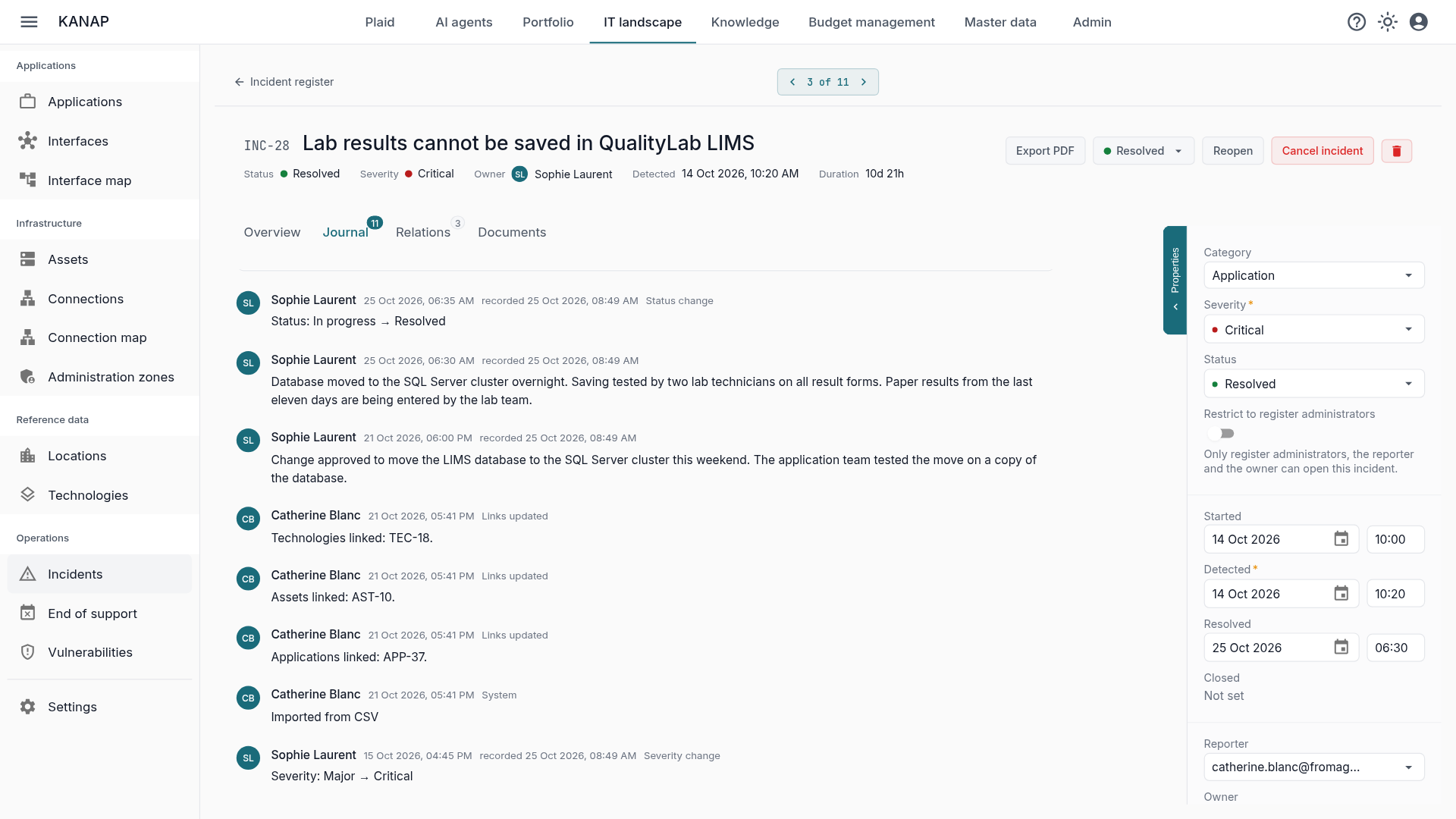
The journal is what turns a form into a register. It keeps everything that happens to the incident: the team’s notes, each status and severity change, each asset or application linked or unlinked, each reopening with its reason. Nothing it contains can be edited or deleted, by anyone.
Notes carry the time of the events. A note entered on Tuesday can be dated Saturday at 11:40 pm and takes its place at that point in the timeline. Alongside, KANAP keeps the actual time it was entered, which nobody can change: backdating stays honest.
Two dates open the timeline: when the incident started and when it was noticed. The gap between the two is often the auditor’s first question. Once the incident is resolved, its duration appears on its own.
The status only moves forward: open, in progress, resolved, closed. Going back requires a register administrator and a reason, also written in the journal.
Numbering stays continuous. A duplicate is cancelled with a reason, and INC-13 never disappears between INC-12 and INC-14: a gap in the numbering would be the first thing an auditor would come back to. An incident that carries notification data cannot be deleted.
Linking the incident to what it hit
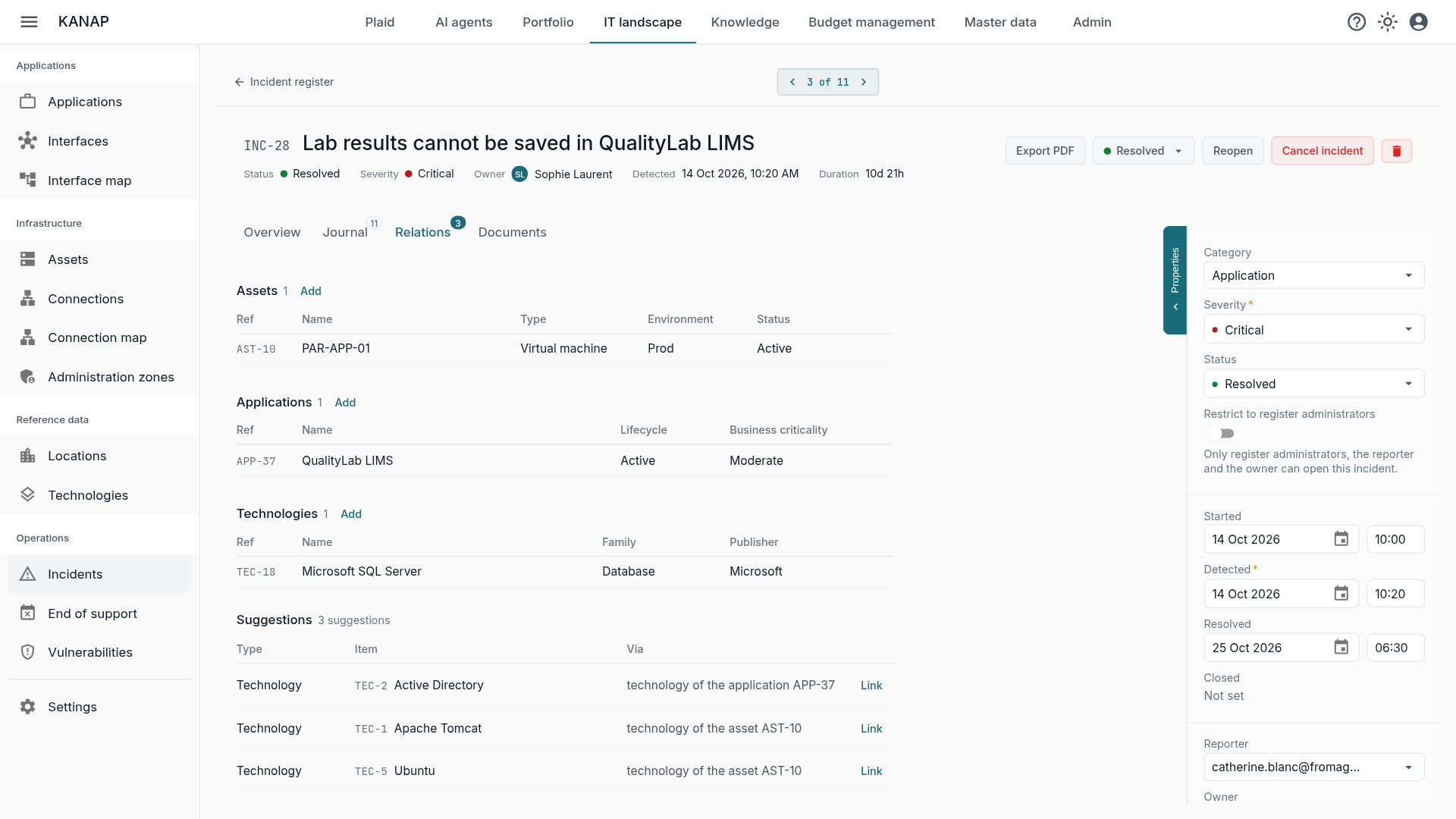
An incident on its own in a register carries little weight. In KANAP, it is linked to the IT landscape: the servers hit, the business applications with their criticality, the technologies involved. KANAP suggests the technologies carried by the servers and applications already linked, with their origin, for example “technology of the asset AST-12”. One click adds them.
The link works both ways. The record of a server, an application or a technology lists its incidents: whoever opens a server sees its history. And a search on a host name such as PAR-ESX-01 finds every incident that hit it.
Corrective actions become tasks, with an owner and a due date, attached to the incident. The review describes the intent; the task proves the work was done.
The incident review, frozen at closing
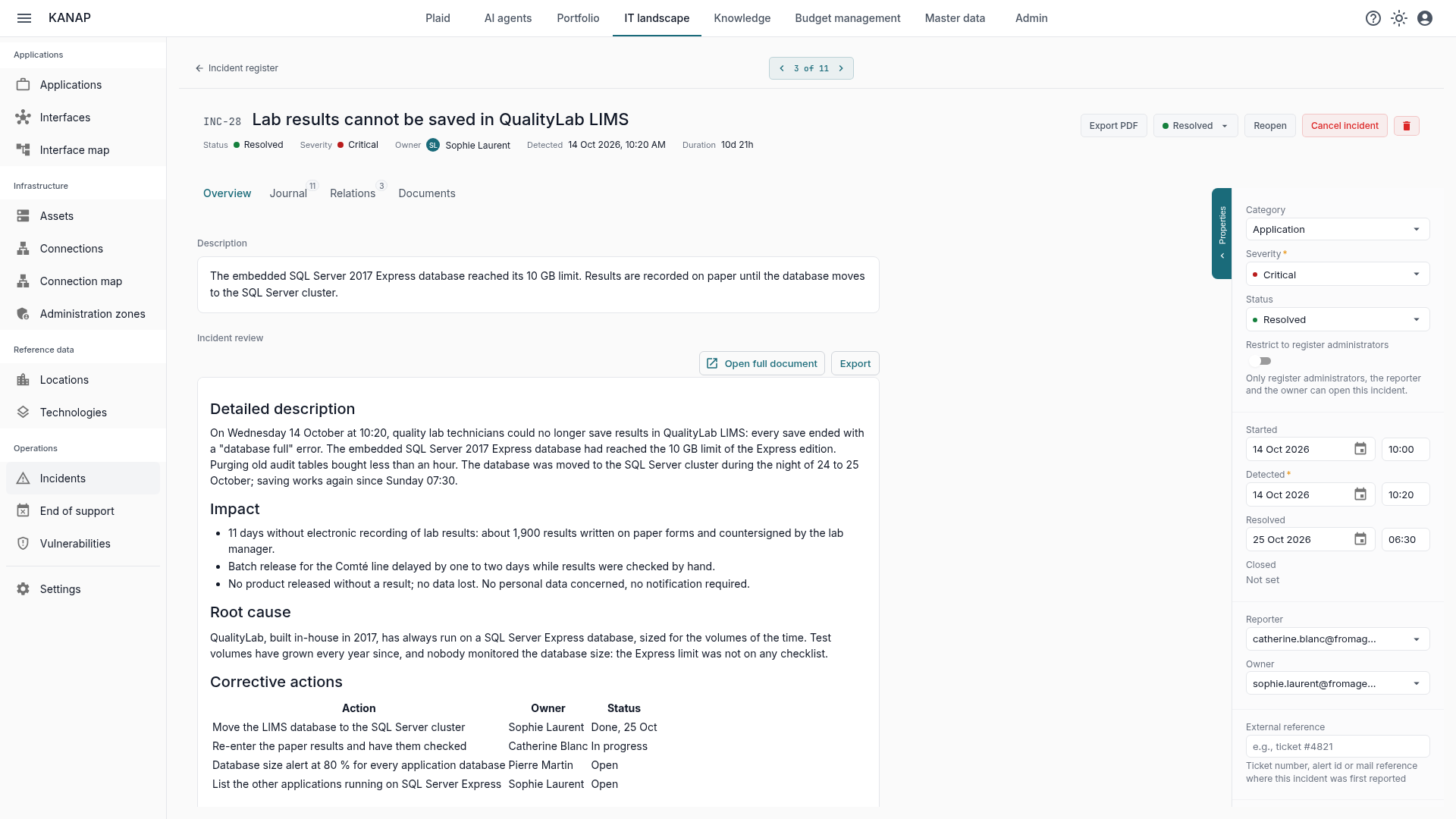
Each incident has two texts. The description fits in one or two sentences: what happened, as observed. The incident review is the full account, written in a real document, with headings, tables and pasted images.
It starts from a five-part template: detailed description, impact, root cause, corrective actions, lessons learned. For a minor incident, the description is enough; for a major incident, the review is the post-mortem. The template is yours and you can adapt it to your needs.
Every save of the review creates a version, kept permanently. At closing, the incident is locked and the review frozen on the version the journal names. That is the one the auditor will read. So finish the review before closing: reopening will then take an administrator.
The regulatory side
Four fields carry the regulatory part of the incident:
- Personal data affected, to tick as soon as personal data has been exposed, altered or lost. It is the filter your data protection officer uses.
- Authority notification required, when the event must be reported to a data protection authority, a cybersecurity agency or a sector regulator.
- Notified on, the filing date.
- Parties informed: regulator, insurer, affected customers, group security.
GDPR article 33 requires you to document every personal data breach, notified or not. The register is the record of it, and an incident that carries this information cannot be deleted. Notification deadlines and thresholds depend on your jurisdiction and your sector: KANAP records the facts and the dates, it does not decide whether to notify.
A sensitive security incident can be restricted. Only register administrators, the reporter and the owner then see it; for everyone else, it does not exist in the list, in search, in Plaid’s answers or in the export.
What the auditor receives
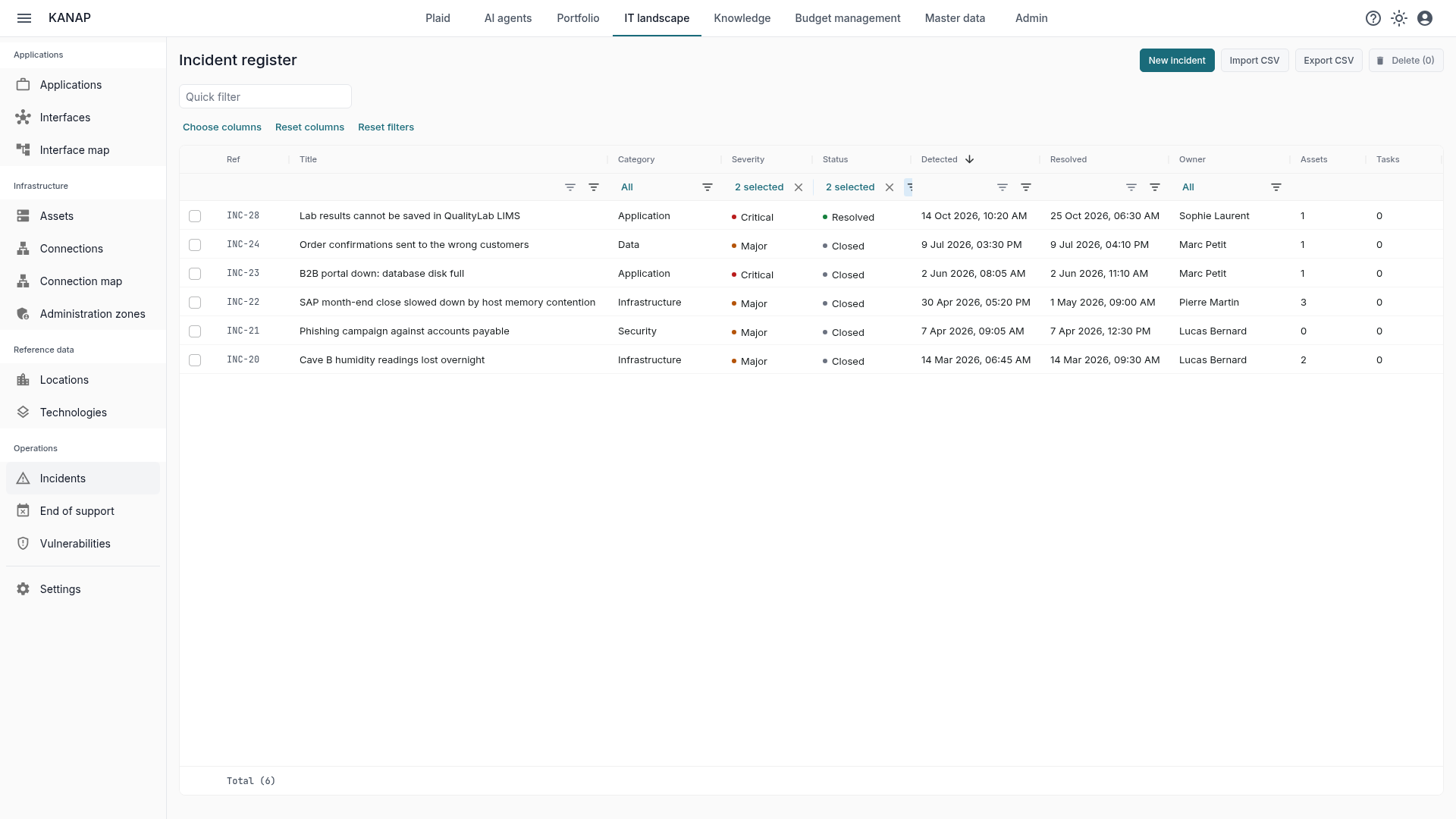
The register can be filtered by period, severity, category or compliance indicator. The Critical and Major severities over the past year give the short list most committees and audits ask for, and the CSV export hands it over as is.
For a specific incident, the PDF export assembles a complete record: properties, description, incident review, journal in chronological order with the review versions, linked assets, applications and tasks, compliance fields and attachments.
Plaid, the assistant built into KANAP, also answers: “How many critical incidents this quarter?”, “List the open incidents on PAR-ESX-01”, “Summary of INC-2”. It reads the journal and the review, and can therefore answer down to the root cause.
Where to start
- Import your existing register, or enter the major incidents of the year.
- Keep the list of categories short: they are what will group a year of incidents.
- Log early, complete as you go, close once the review is written.
- Review the register every quarter: the categories that recur and the servers that appear more than once may feed the next budget request or the next project.
To see all of this in action, a free 14-day trial of our hosted version gives access to the sample data of the fictional Fromage & Co group, incident register included, loaded in a minute. KANAP is fully open source: it can also be installed for free on your own servers.