
Vulnerabilities: from the CVE to the business application
Every week brings its share of critical vulnerabilities. The real question is: which ones affect your business applications, and who has to act? KANAP can help, from the published CVE to the recorded decision, including identifying the servers and applications affected.
Thursday morning, the feed announces thirty new critical vulnerabilities. The CISO asks which ones affect us. The infrastructure team opens a spreadsheet, looks up products, versions and servers, and logs in here and there to check. The next day, nobody is yet sure the information is complete.
The problem is the path from a published vulnerability to the business application it threatens. Here is a method to follow that trail, and how KANAP fits it on a single screen.
Four links to get an answer
A vulnerability targets a product and some of its versions. To know whether it affects you, you need to connect four links:
- The technology: SQL Server, Tomcat, vCenter, what your applications need to run.
- Its version: SQL Server 2019 does not have the same vulnerabilities as SQL Server 2022.
- The server that hosts it.
- The business application that depends on it, with its criticality and its owner.
In KANAP, all these links exist: applications and their servers in the IT landscape, and technologies and their versions in between.
Two official sources, combined
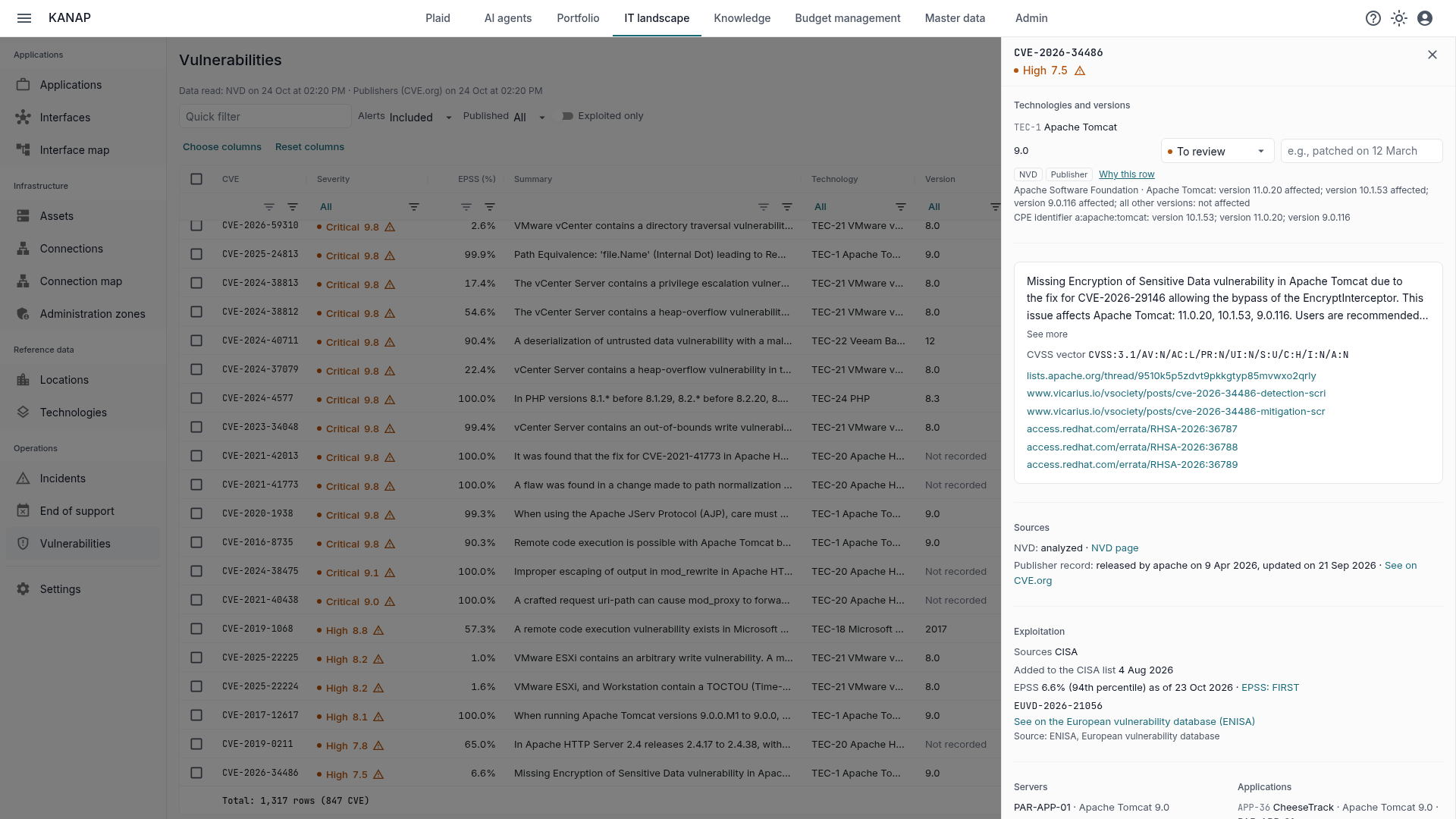
Every 6 hours, KANAP reads the NVD, the US national vulnerability database, and compares each vulnerability with your technologies, version by version. The NVD is the reference, but it has one flaw: it matches vulnerabilities to products late, and sometimes never.
An example, on a technology everyone uses. In 2026, the Apache Software Foundation published 60 Apache Tomcat vulnerabilities. On 23 October, the NVD had matched 40 of them to the product. The other 20, published on 23 September and 20 October, including 6 critical and 7 high, still had no product in the NVD.
So KANAP reads a second source: the records vendors publish themselves on CVE.org, with their products and versions. A row exists as soon as either source matches the vulnerability to your technology. When the NVD has not yet scored a vulnerability, KANAP shows the vendor’s score.
Each row says which source found it: the NVD, the vendor, or both. “Why this row” gives the criterion in plain words, for example “Apache Tomcat: versions 9.0.0 to 9.0.98 affected”. And the page shows when each source was last read, with a warning if a read failed.
Exploited vulnerabilities first
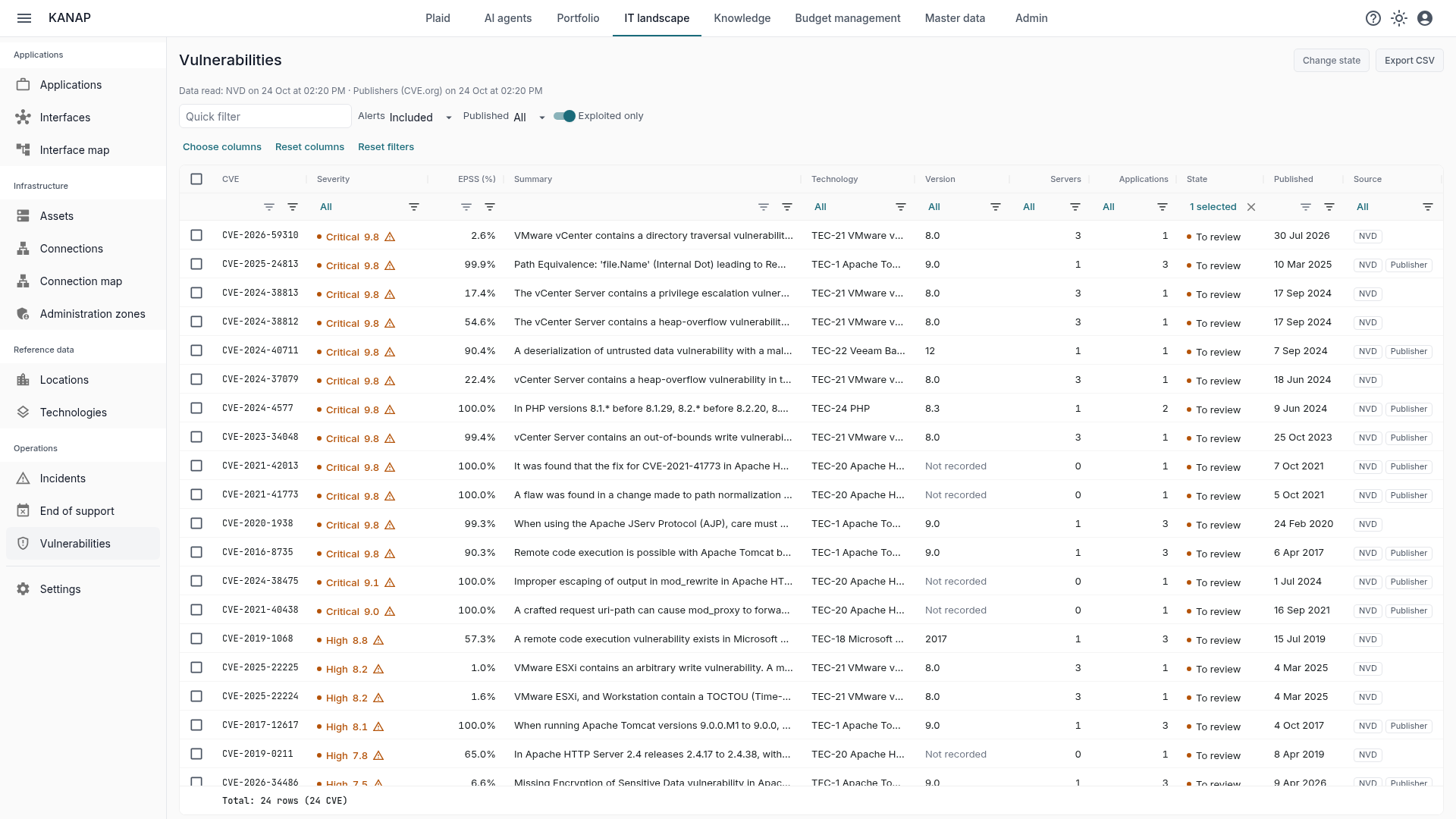
The CVSS score gives the theoretical severity of a vulnerability, not the actual risk it creates. A vulnerability scored 9.8 that nobody exploits weighs less than one scored 7.5 that is actively used. So KANAP combines three exploitation signals:
- The catalogs of exploited vulnerabilities from CISA, the US agency, and from the European Union. A vulnerability they list carries an alert icon, whose tooltip names the catalogs and, when CISA has observed it, use by ransomware.
- EPSS, the probability that a vulnerability will be exploited within 30 days, computed every day by FIRST.
- ENISA’s European vulnerability database, the one NIS2 refers to: each vulnerability links to it when it is listed there.
The list opens on exploited vulnerabilities, then the most severe. The “Exploited only” filter keeps only those: it is the most important view.
Impact analysis
The same vulnerability does not carry the same weight on the customer portal as on a test server. This is where KANAP stands apart from a simple list of CVEs: each row says how many servers and applications it reaches, and the filters let you start from a server or an application to see its vulnerabilities.
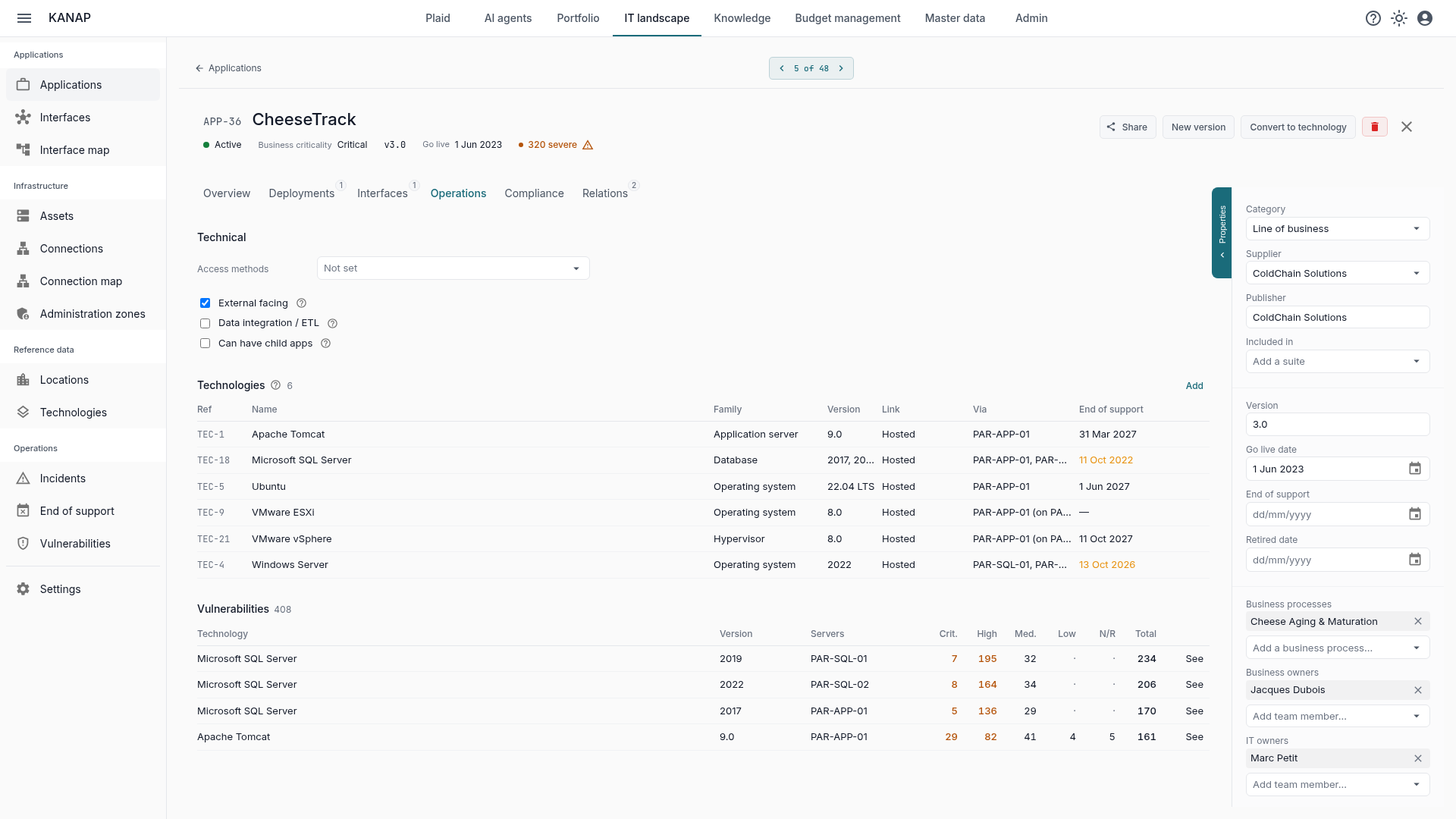
On an application record, the Vulnerabilities section sums up its vulnerabilities technology by technology, with the number of critical, high and medium ones. A badge in the header flags severe vulnerabilities. The application owner sees their exposure without opening the vulnerabilities page.
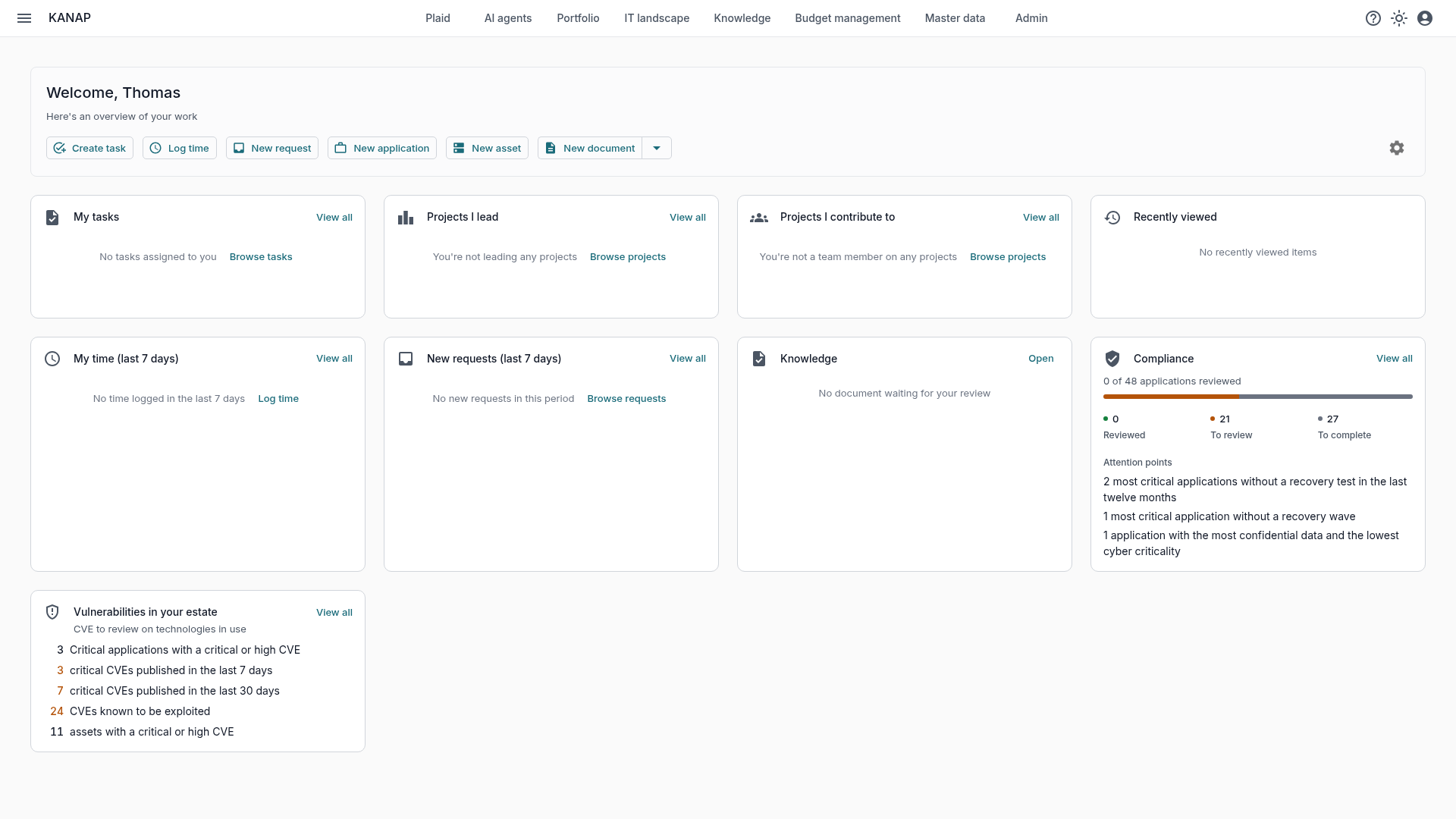
On the dashboard, the “Vulnerabilities in your estate” tile asks the questions in the order a CIO would: how many applications of the highest criticality have a critical or high vulnerability, how many critical vulnerabilities were published in the last 7 and 30 days, how many are exploited, how many servers have a severe vulnerability. Each line opens the matching list. Criticality comes from the classification of your applications, presented in the article Classifying your applications.
You choose what raises an alert
Not every technology deserves the same attention. On each technology, a switch includes it in alerts or takes it out, and each version can have its own.
Two families start without alerts by default; you are free to turn them on. Operating systems, first: KANAP does not know a server’s patch level, and a full operating system would bring up hundreds of vulnerabilities already patched. Online services, second: the provider patches a service it runs itself. If you want to follow a specific version, for example the one on your most exposed servers, just turn on its switch.
Nothing is hidden, though. A version outside alerts is still matched against vulnerabilities and visible under the “Alerts” filter: it is only set aside in the counts, the tiles and the emails.
Recording how alerts are handled
A vulnerability is never just “seen”: it is handled, set aside with a reason, or still to review. Each row carries one of these three states (to review, handled, not affected) and a note: “patched on 12 March, change CHG-123”. The audit log keeps who changed which state, and when.
Bulk handling saves working row by row. For example, to set aside the PostgreSQL vulnerabilities on installations whose version is not filled in: a filter on the technology and the version, a checkbox, the “not affected” state and the reason in the note. Before you confirm, KANAP says how many rows and vulnerabilities the change touches.
The rest follows naturally. The CSV export keeps the filters on screen, for the security committee or the auditor. The IT owners of a technology receive an email for its new critical, high or exploited vulnerabilities, only once per vulnerability. And Plaid, the assistant built into KANAP, answers questions about vulnerabilities, within each user’s access rights.
This is what a NIS2 audit expects: not a list of vulnerabilities, but the record of what the team did about them.
KANAP is not a scanner, it complements one
A vulnerability scanner sees hosts, installed packages and applied patches. KANAP sees something else: business applications, their criticality, their owners and the technologies they depend on. It does not tell you whether a patch is applied on a given server; it tells you which applications a vulnerability can affect, and who should look.
Where to start
- Create your technologies from the catalog: 192 products, with their versions, support dates and vulnerability identifiers already filled in, ready to use.
- Enter the versions on your servers and applications, or import the links from a CSV file.
- Name the IT owners of each technology: they are the ones who will receive the alerts.
- Open the Vulnerabilities page on “Exploited only”.
If you host KANAP yourself, first turn on vulnerabilities and add an NVD key, as the configuration guide explains.
To see all of this in action, a free 14-day trial of our hosted version gives access to the sample data of the fictional Fromage & Co group, loaded in a minute. KANAP is fully open source: it can also be installed for free on your own servers.