
KANAP 26.10.6: from the vulnerability to the business application
26.10.6 adds technologies to KANAP, a layer between applications and servers, and vulnerability management. Published vulnerabilities and end of support now reach the business applications they affect. A tour of the release.
One morning, a bulletin announces a critical vulnerability in Tomcat, already exploited. The useful question is not “do we run Tomcat?”, but “which business applications depend on it, on which servers, and who has to act today?”.
Until now, KANAP knew your applications and your servers, but not what runs between them. The new release adds that link: technologies and their versions. Published vulnerabilities and end of support dates now reach the application, its owner and its criticality. This release also updates the base images, in response to the many vulnerabilities published recently. If you host KANAP yourself, upgrade!
Technologies, the link between applications and servers
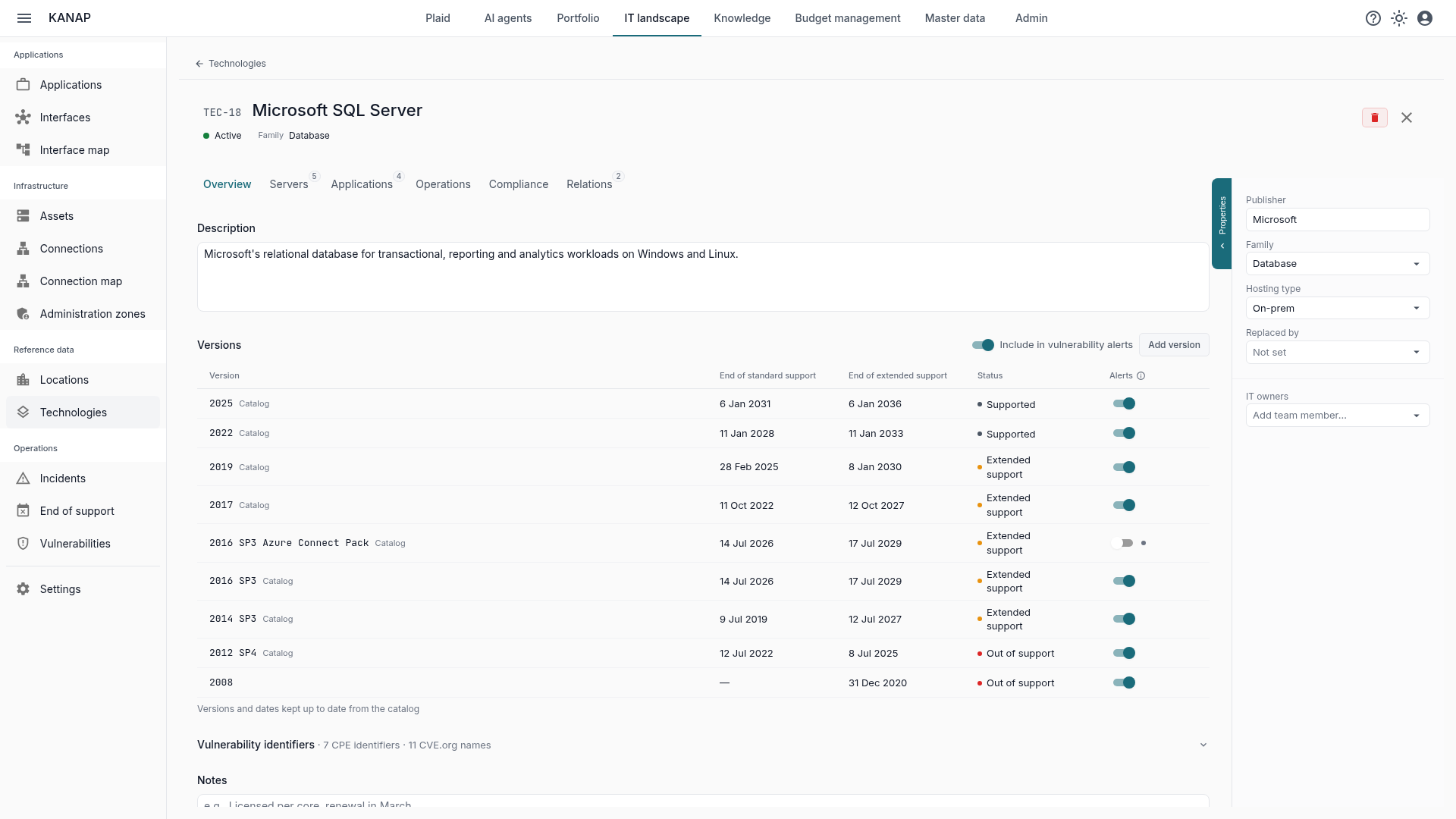
A technology is what IT runs or subscribes to so that applications work: SQL Server, vSphere, Active Directory, Entra ID, Tomcat. Each one carries its versions and their end of support dates.
A catalog of 192 products. Pick an entry: KANAP creates the technology with its vendor, family, hosting type, versions and support dates. It then stays up to date: a newly released version is added, a moved date follows. Dates come from endoflife.date and, for the products it does not cover (Check Point, Cisco, Juniper, Arista, NetScaler, Dell storage, WebLogic…), from the vendors’ official pages. For those, each version shows its source and the date it was checked. What you entered by hand is kept.
A server’s operating system is a technology. Windows Server, the main Linux distributions, AIX, IBM i and Solaris appear at the top of the server record, with their version and support dates.
Linked to servers and applications. A technology is hosted by servers and declared by applications. To get started quickly, these links can be imported and exported as CSV files.
Plaid, the AI assistant built into KANAP, or your own AI tool connected over MCP, answer questions about technologies, their versions, their servers and their applications.
Vulnerabilities, from the CVE to the business application
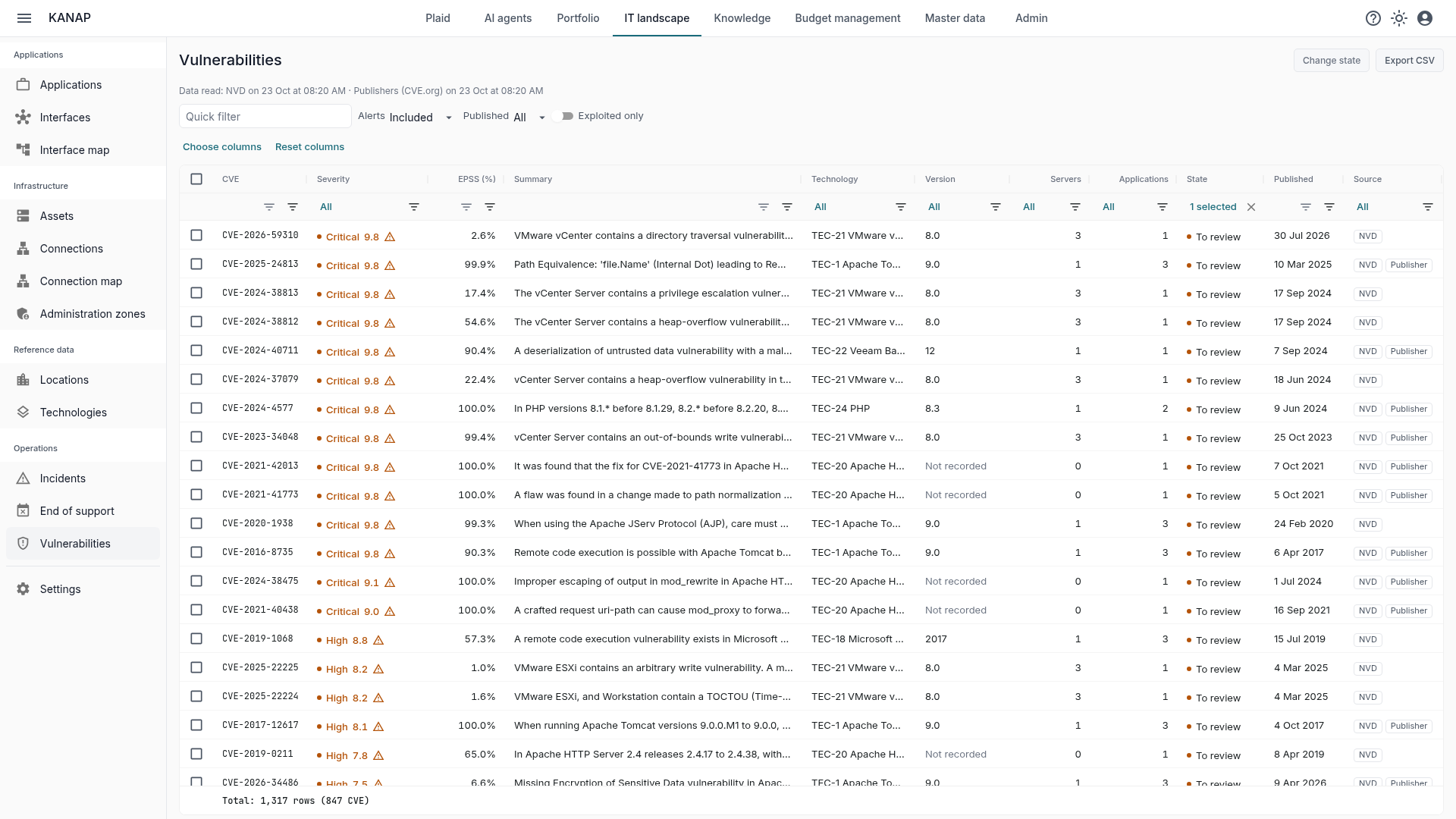
Two data sources, combined. Every 6 hours, KANAP reads the NVD, the US national vulnerability database, and compares each vulnerability with your technologies, version by version. But the NVD does not analyse everything. In our October 2026 review, it had matched a product to only 11 of the 65 vulnerabilities SAP published from January to April 2025. So KANAP also reads the records vendors publish themselves on CVE.org. Each row says which source found it and why, and the page says when each source was last read.
Exploited vulnerabilities first. A vulnerability listed by CISA or by the European Union catalog carries an alert icon, with a link to ENISA’s European vulnerability database, the reference for NIS2. The probability of exploitation within 30 days (EPSS) is shown too. The list opens on exploited vulnerabilities, then the most severe.
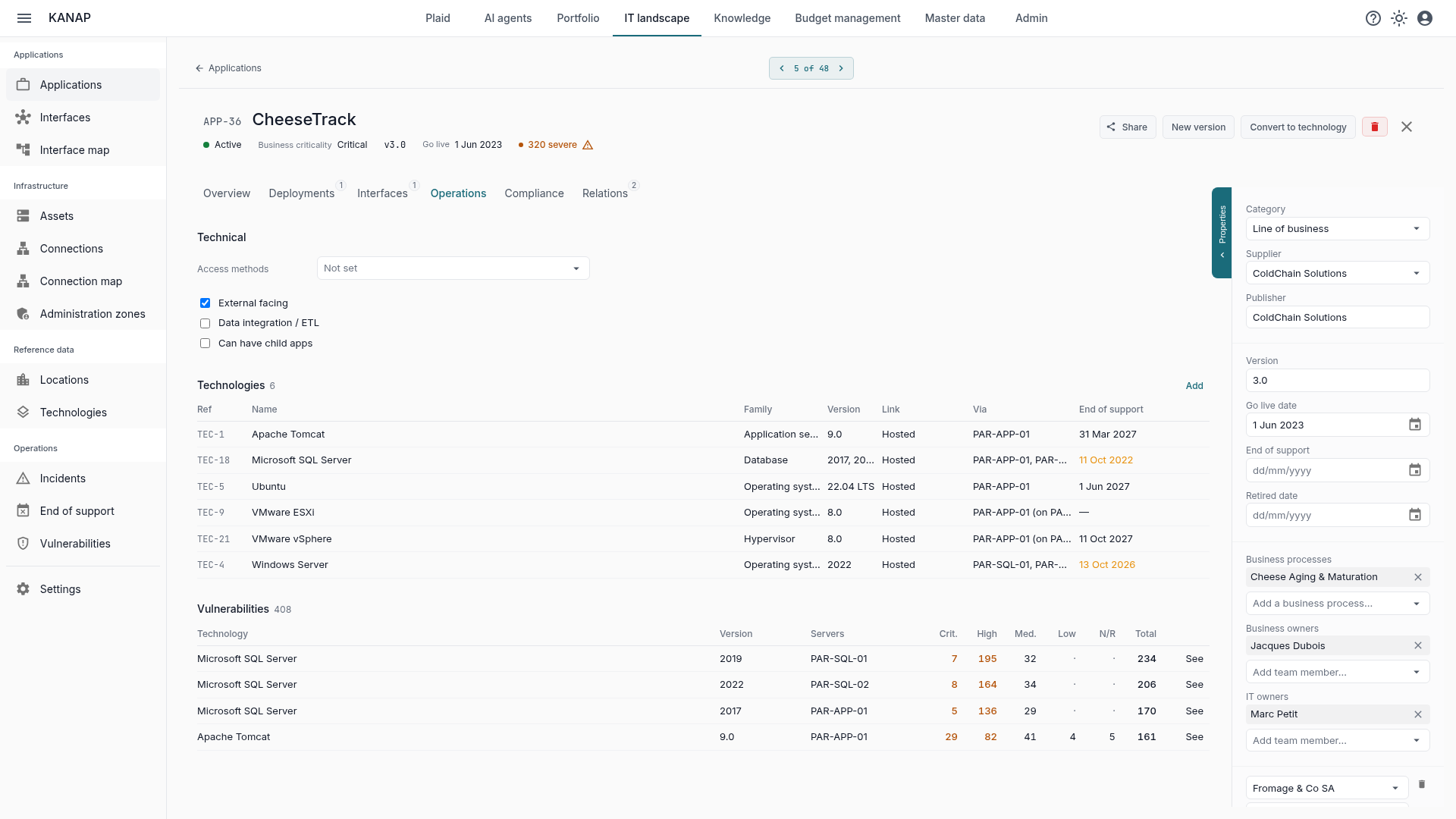
Seen from your servers and applications. Server and application lists have a column for vulnerabilities to review. Each record has its section and a badge for severe vulnerabilities, and the “Vulnerabilities in your estate” tile on the dashboard sums up what needs your attention.
You choose what raises an alert, by technology and by version. Operating systems and online services start outside alerts. KANAP does not know a server’s patch level, and the provider of an online service patches it itself. You can bring them back, one version at a time if you wish.
Every decision is recorded. Each row is to review, addressed or not affected, with a note: “patched on 12 March, change CHG-123”. The audit log keeps who changed what. One filter is enough to change the state of many rows at once. The IT owners of a technology can receive an email for its new critical, high or exploited vulnerabilities. And Plaid also answers your questions about vulnerabilities.
KANAP does not replace a scanner. It sees neither the packages installed on a Linux server nor the patches applied to a Windows one. It tells you which business applications a vulnerability can affect, and who should look. When it does not affect you, the row moves to “not affected”, with the reason.
End of support, administration zones, and what goes down with a server
See end of support coming. The new “End of support” report lists the technology versions, operating systems, applications and hardware whose support ends within the horizon you choose. For each, it shows the servers and applications affected. A second view lists the missing data when the information is not available.
Who administers what. The Administration zones view follows the tiered administration model, recommended by ANSSI, the French cybersecurity agency, and other specialised bodies. It shows your zones and the assets in each, your directory services and your domains, with their forests, trusts and domain controllers. It flags gaps in the separation between zones. New KANAP workspaces start with three zones, Tier 0 to Tier 2. It is part of the answer to the questions of a NIS2 review on privileged access.
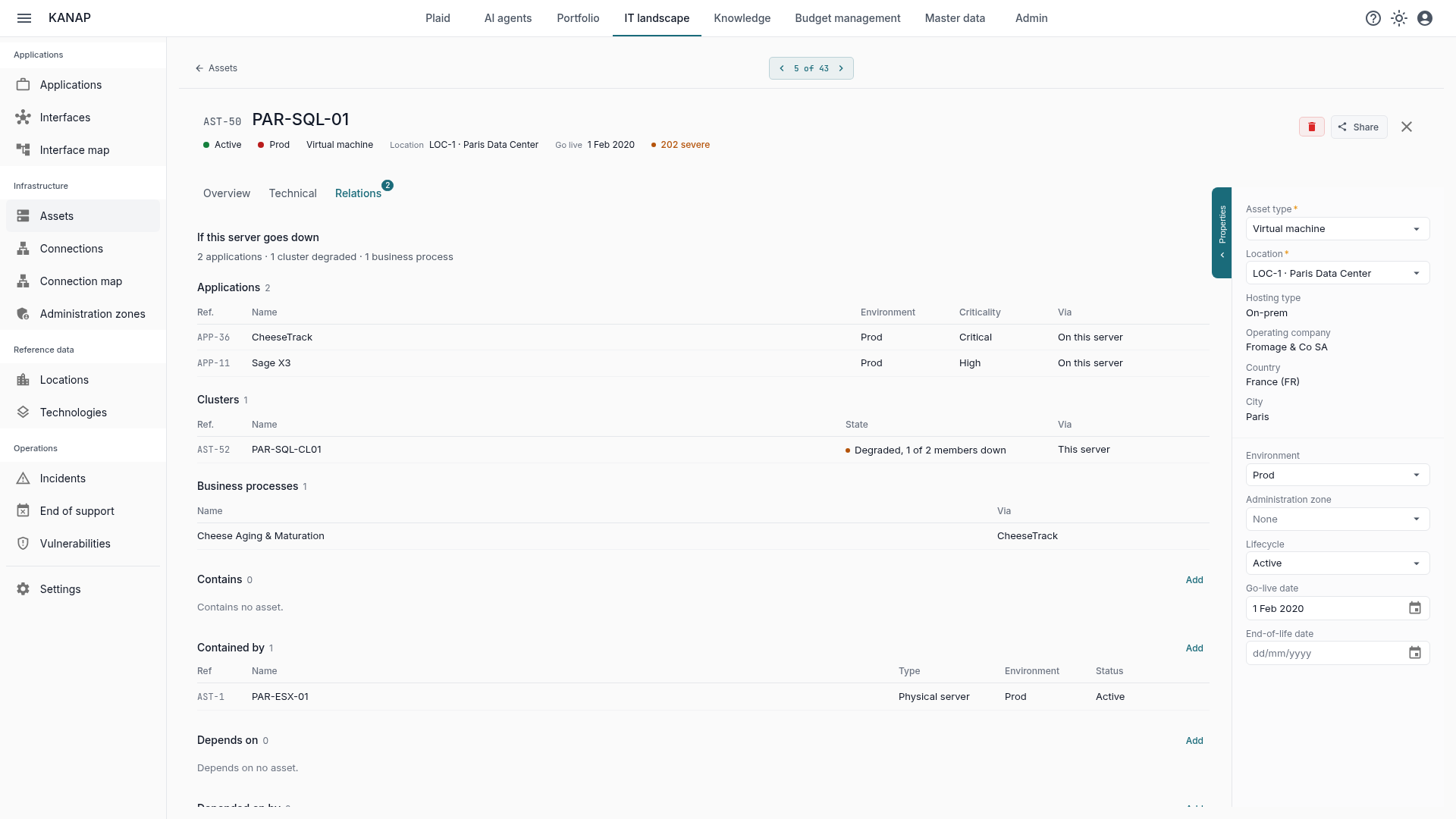
If this server goes down. On a server record, the Relations tab opens on what would stop with it. A summary line counts the applications, assets, clusters and business processes affected. A table per type then gives the detail: the applications running on it, with their criticality, the assets that depend on it, and the degraded or failed clusters.
These views build on the classification of your applications, presented in the article Classifying your applications. As always in KANAP, everything is linked, and the value comes from the links.
A Relations tab on every record
Applications, technologies, assets, contracts, projects, requests, budget lines, incidents, interfaces and locations now share the same Relations tab. Each linked record appears in a dense table, with the facts that matter: status, due date, amount. A link is added from a search and saved at once. KANAP also suggests links: on a contract, the applications and assets of the same supplier; on an application, the technologies of its servers. A link can only point to what you are allowed to read.
Budget moves forward too
The budget management module, one of the richest in KANAP, keeps evolving.
- Currencies: an amount without an exchange rate for its year is left out of totals, reports and chargeback, and flagged with a link to enter the rate. A rate can be entered by hand. Changing the reporting currency fetches the rates of every year. Subsidiaries’ turnover is converted before it serves as a chargeback key. See the article Managing currencies in the IT budget.
- Cost centers: on a budget line, the list only offers the cost centers of the paying company.
- Budget file: the export carries the cost center path, and so the department, and exports the current year in one click. The pre-import check flags a row whose company differs from its cost center’s company.
- Companies: numbers and input in your language, turnover with its currency, a stricter CSV import, and the freeze page says who froze a year, and when.
Upgrading
On the hosted service, there is nothing to do: you are already on 26.10.6.
If you host KANAP and already follow the stable branch (version 26.10.1 or later), go straight to 26.10.6. It includes the components that fix the latest published vulnerabilities: Node.js 24.22.1, nginx 1.31.8, OpenSSL 3.5.9 and root certificates without the compromised eMudhra keys. No action is required.
If your installation predates 26.10.1, it still follows the main branch. Move it to stable first, as the operations guide explains. Then read the notes of every version up to 26.10.6: their recommendations add up.
On-premise, vulnerabilities and the daily catalog sync stay off until you turn them on. The server then needs to reach the NVD, CVE.org and the exploitation sources, or a mirror of each. A free NVD API key is recommended to shorten query times. Everything is described in the configuration guide.
Following new releases
In the coming days, we will cover these features on the blog: vulnerabilities, technologies, end of support, administration zones, and the incident register. Stay tuned!