
Managing currencies in the IT budget
Everyone enters amounts in their own currency, KANAP consolidates them in the group's: automatic exchange rates, aligned with your budget rates if you wish, and totals you can trust.
A US subsidiary pays for its licences in dollars. Headquarters signs a SaaS subscription billed in dollars and vendor support billed in Swiss francs. And the group IT budget is presented in euros.
In a spreadsheet, that means a rates sheet in a corner of the workbook, conversion formulas copied line after line, and a question that comes back at every presentation: which rate did we use?
In KANAP, everyone enters the budget in the currency of their invoice. Everything is consolidated, automatically and cleanly, in the group’s reference currency. Exchange rates take care of themselves, and follow your financial controllers’ rates whenever you want.
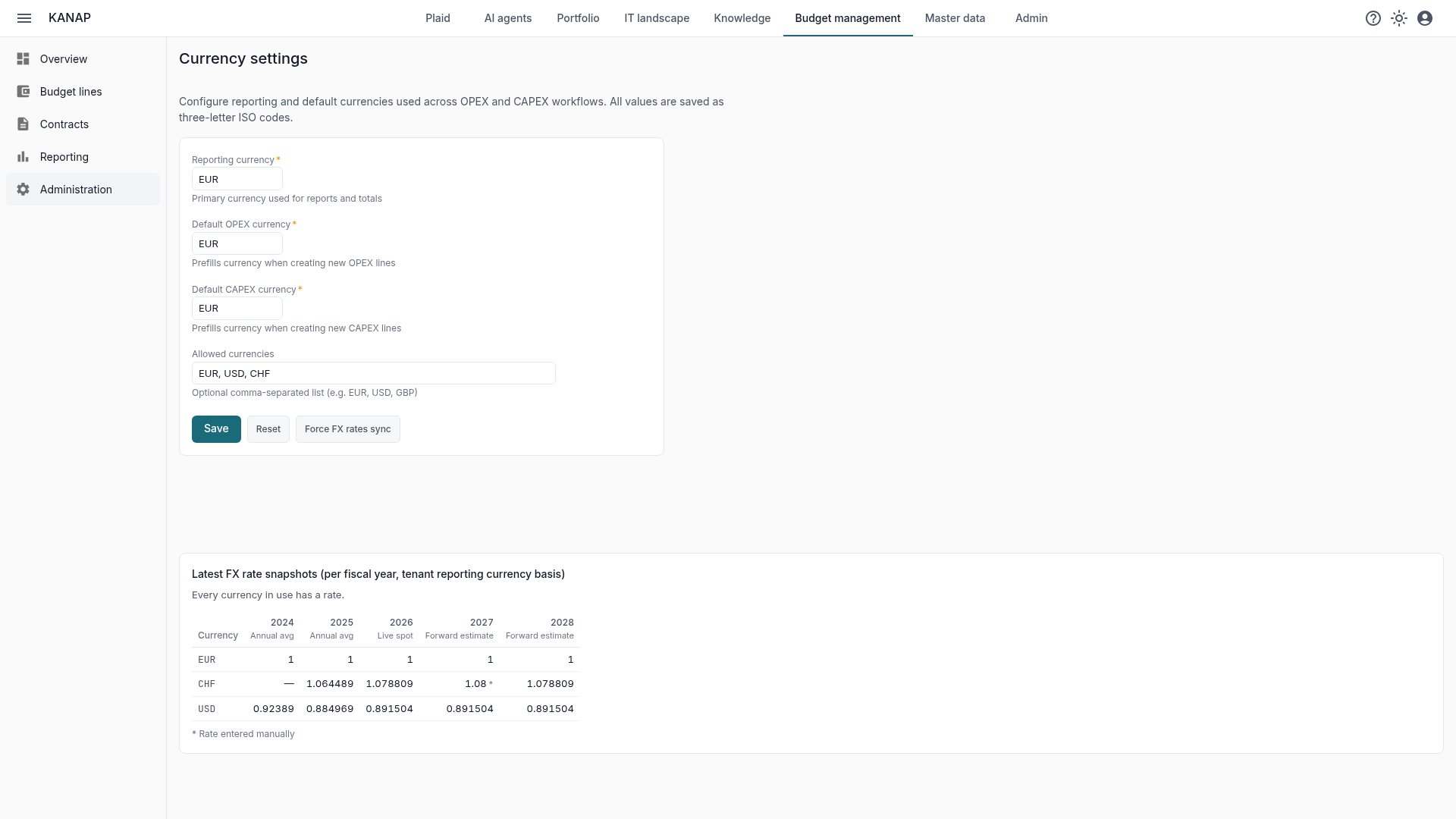
All the settings on one page
Everything happens in Budget management › Administration › Currencies.
- The reporting currency: the one the group consolidates in. Lists, totals and reports are shown in this currency.
- The default currencies, one for OPEX and one for CAPEX: they are suggested when a line is created, without limiting the choice.
- The allowed currencies, if you want to restrict the list. Leave it empty unless you have a specific reason: any valid ISO code is then accepted.
The reporting currency is chosen once. It can change later: a dialog then explains what the change involves before applying it, and the amounts entered do not move.
Everyone enters amounts in their own currency
Whoever prepares a budget line enters it in the currency of the invoice they will receive. No conversion to make, no rate to look up: they pick the currency in the form, and that’s it.
This holds across budget management:
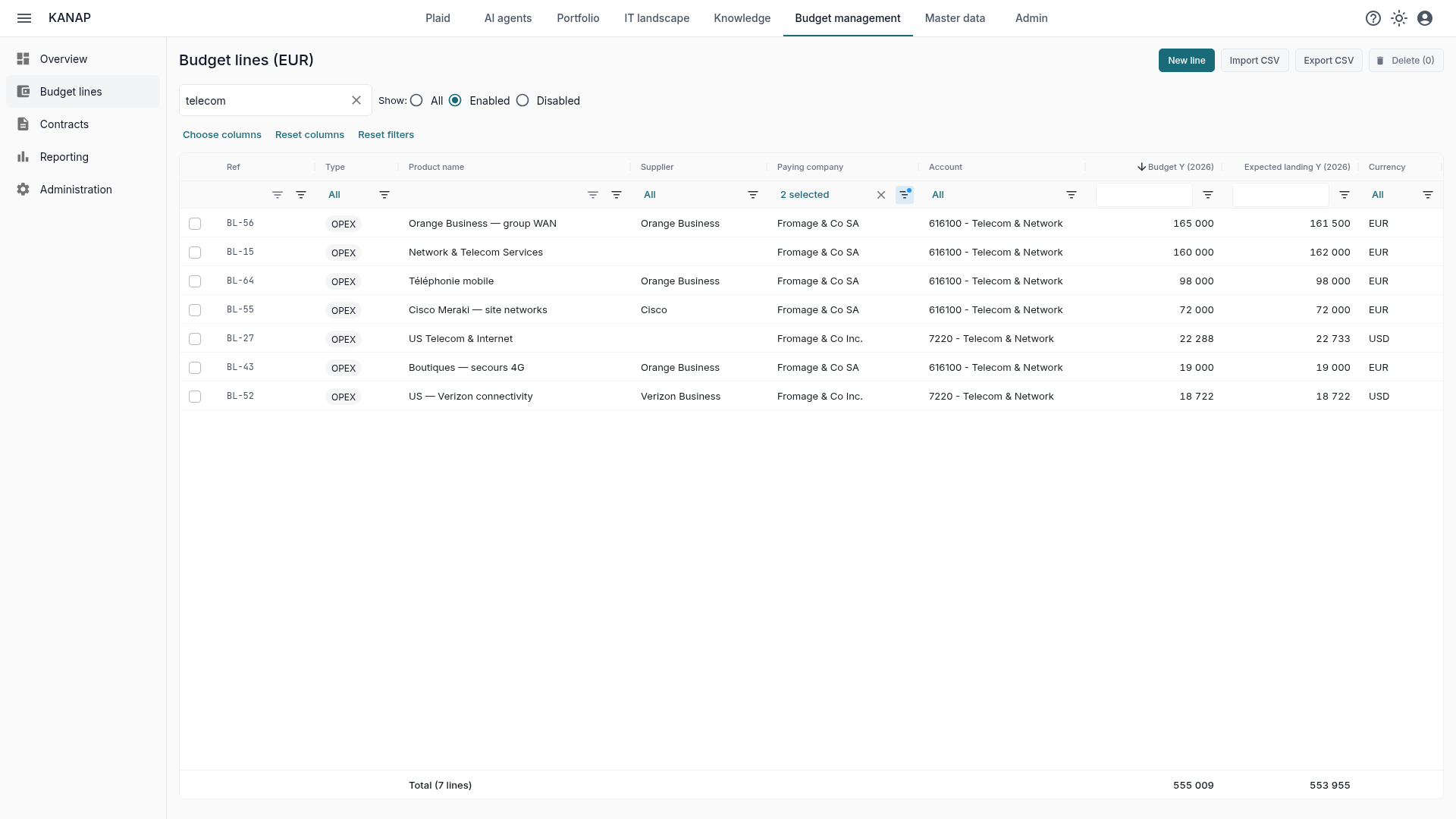
- Budget lines: each one has its own currency. At Fromage & Co, our sample company, the US subsidiary budgets its managed IT services, its e-commerce platform and its contractors in dollars, next to the headquarters’ lines in euros.
- Contracts: a contract signed in a foreign currency keeps its currency. A SaaS subscription billed in dollars to the French company, support billed in Swiss francs: the contract amount stays the one at signature, and its commitment is compared with the budget in the reporting currency.
- Companies: each one has its base currency, and its turnover is entered in millions of that currency, for example USD 35M for Fromage & Co Inc.
Amounts are stored as they were entered. CSV exports keep each line’s currency: the file can be reimported or analysed with no conversion to undo.
Everything is consolidated in the group’s currency
KANAP converts on display, each year at that year’s rate. Nobody has a formula to write or a “countervalue” column to maintain.
- The budget lines list: the Currency column keeps each line’s currency, amounts and the totals row are shown in the reporting currency, and totals recalculate on every filter.
- The overview and the ten budget reports are shown in the reporting currency.
- Contracts: commitment, linked budget and gap are compared in the same currency.
- Chargeback: each company’s turnover is converted before it is used as an allocation key. An allocation between France and the United States finally compares euros with euros. See the article on chargeback.
And if the group ever changes its consolidation currency, changing the reporting currency is enough: everything is converted again, without touching a single line.
Rates refreshed automatically
By default, there is nothing to do. KANAP fetches one rate per currency and per year for every currency in use, and refreshes them every 30 days.
- Past years: the World Bank’s annual averages. Until they are published, the closest published year, marked as an estimate.
- Current year: today’s rate.
- Future years: the current year’s rate, carried forward as an estimate to prepare the budget.
The rate table, under the settings, shows each rate and its source. Before a committee, the Force FX rates sync button updates them right away and says what it fetched.
Your budget rates, if you have them
Many groups set their own rates for the fiscal year: the budget rates of financial control or treasury. The IT budget then has to speak the same language as the rest of the group.
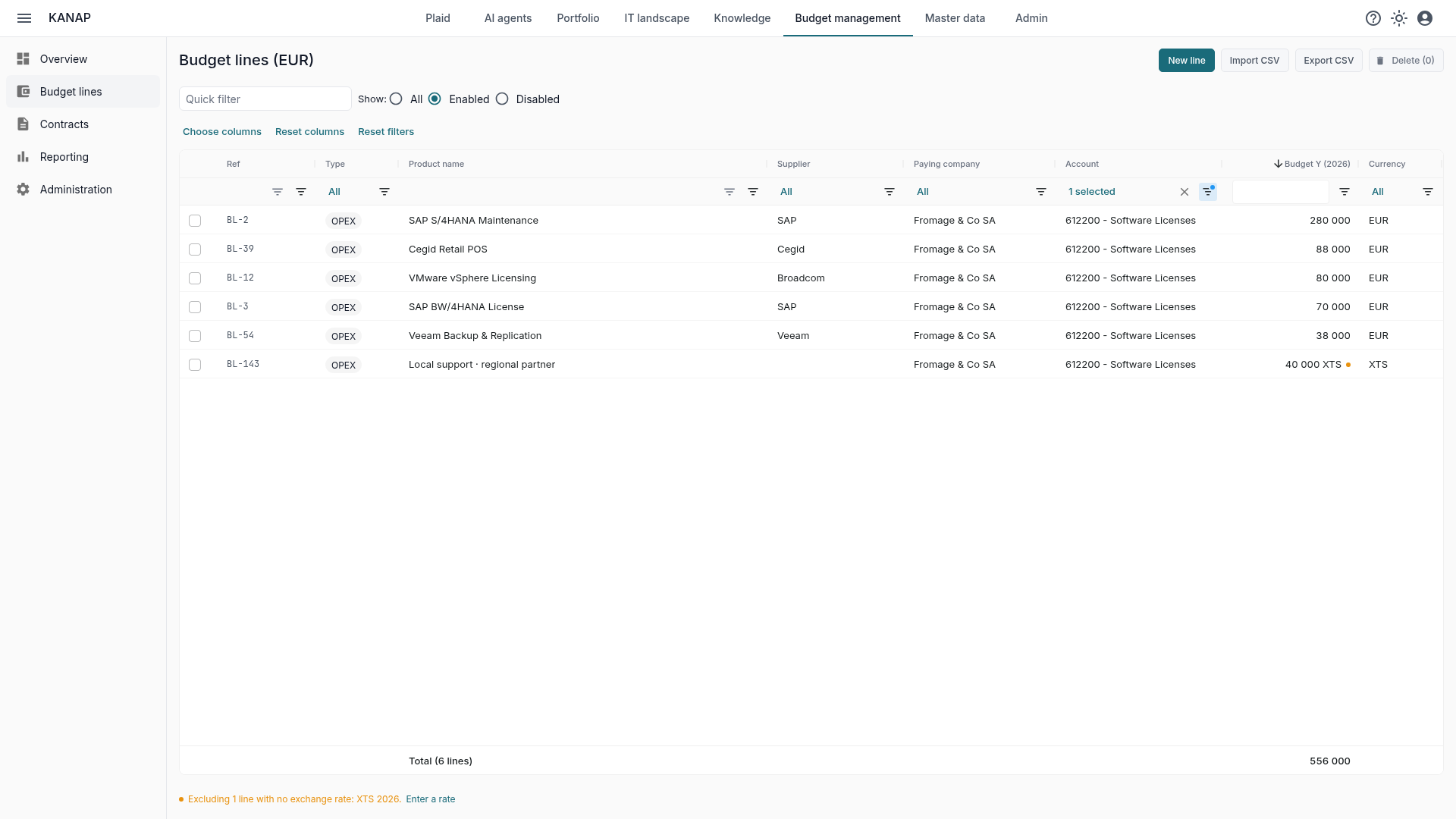
Enter a rate by hand. In the rate table, a click on a cell opens the Manual exchange rate dialog: you enter your financial controllers’ rate for that currency and that year. It replaces the automatic rate until you remove it, it is marked with an asterisk in the table, and every entry is recorded in the audit log.
Freeze the rates with the budget. Once the budget is approved, freezing its default column also freezes that year’s rates. Amounts stay converted at the rate set of the freeze, even when newer rates arrive. A budget signed off with the dollar at €0.92 does not change in June because the dollar moved. See the article on reporting.
Errors and gaps are flagged
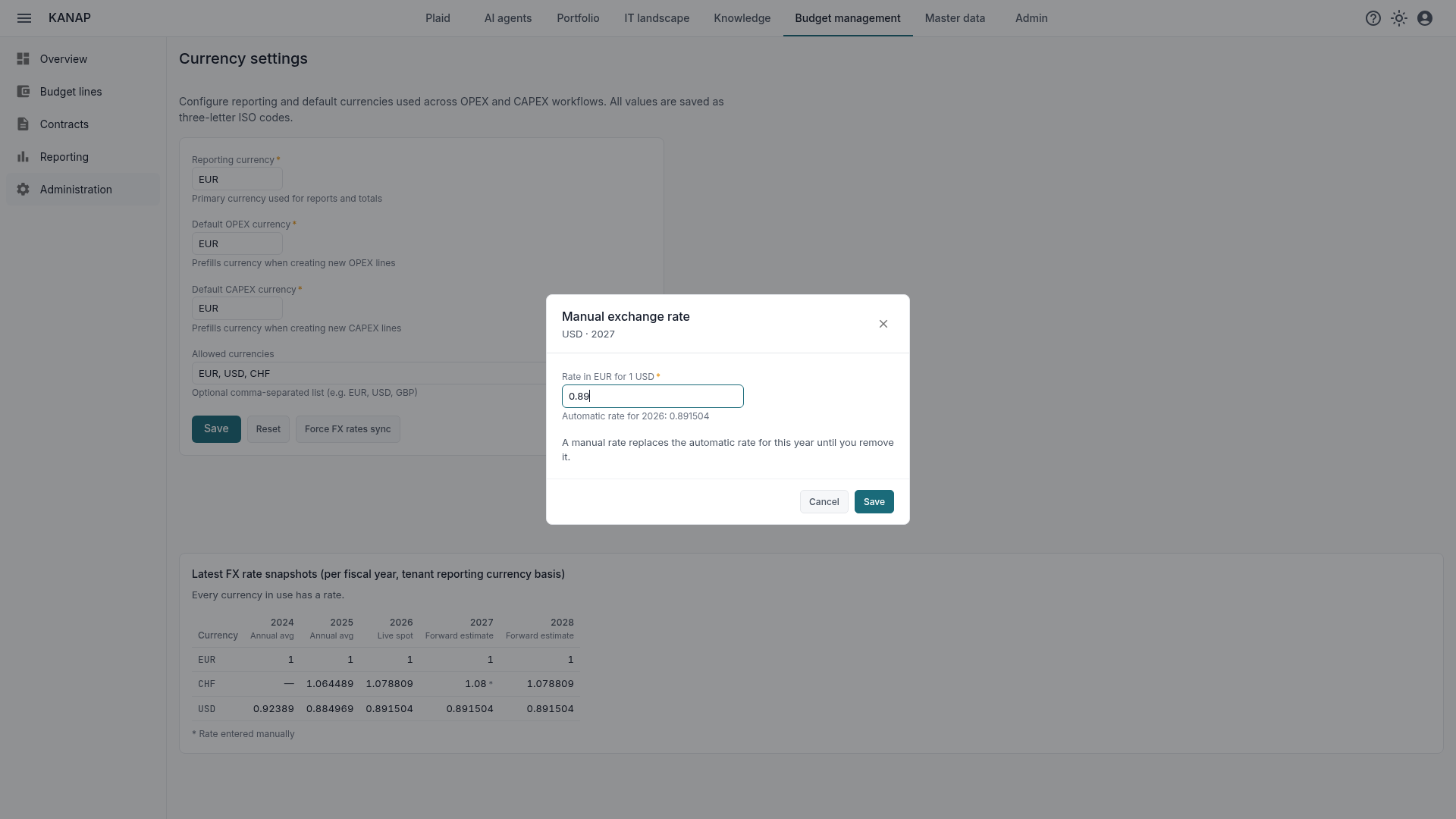
Sometimes a rate is missing: an uncommon currency, or a past year the sources have not published yet. A spreadsheet then often counts the amount at 1, and 100,000 dollars become 100,000 euros without anyone noticing.
KANAP never does that. The amount is left out of that year’s totals, and the screen says so: “Excluding 3 lines with no exchange rate: USD 2026”, under the list totals, on the overview, at the top of the reports, in contracts. On the line itself, the amount is then shown in its own currency, with an orange mark.
KANAP fetches the rate in the background, and the next display uses it as soon as a source publishes it. If none does, or if your installation has no internet access, the Currencies page lists the missing rates, and a manual rate settles the matter at once.
Where to start
- Choose the reporting currency: the one the group consolidates in.
- Give each company its currency, then enter lines and contracts in the currency of their invoice.
- If your financial controllers have budget rates, enter them for the year you are preparing.
- Freeze the budget column once the budget is approved: its rates are frozen with it.
To see all of this on a budget already entered, a free 14-day trial of our hosted version gives access to the sample data of the fictional Fromage & Co group, loaded in a minute. KANAP is fully open source: it can also be installed for free on your own servers.