
OPEX and CAPEX: the IT budget, ready for the finance review
Operating and capital spending in one place: IT builds its budget simply, and comes to the review with finance ready.
The IT budget comes in two envelopes: operating and capital spending. Often, each one lives in its own file, with its own calendar and the person who keeps it. Then comes the review with finance and its questions: how much is operating, how much is investment, what is it for, what does this program really cost?
Each answer then takes a manual consolidation. KANAP is where IT prepares its budget, OPEX and CAPEX together, simply. And because every line is classified as it is entered, IT comes to the review with figures that are clean, consistent and easy to justify.
OPEX or CAPEX, the rule in plain words
OPEX keeps the information system running during the year: subscriptions, maintenance, recurring services. CAPEX creates or improves an asset used over several years: servers, workstations, capitalized development. What gets capitalized follows the company’s accounting rules, which finance sets with IT.
A second question often gets mixed with the first: run or build? Run keeps existing services going, build creates or changes them. A build project often carries both kinds of spending: capitalized development in CAPEX, training and change management in OPEX. KANAP keeps both answers on every line, in two separate fields, and still lets you consolidate them.
One list, one workspace
In KANAP, OPEX and CAPEX are a simple field of the budget line. Lines of both types share the same budget columns (scenarios) per year, the same allocations across companies and departments, the same links to applications, projects, contracts and suppliers. The filter of the Type column isolates one or the other in one click.
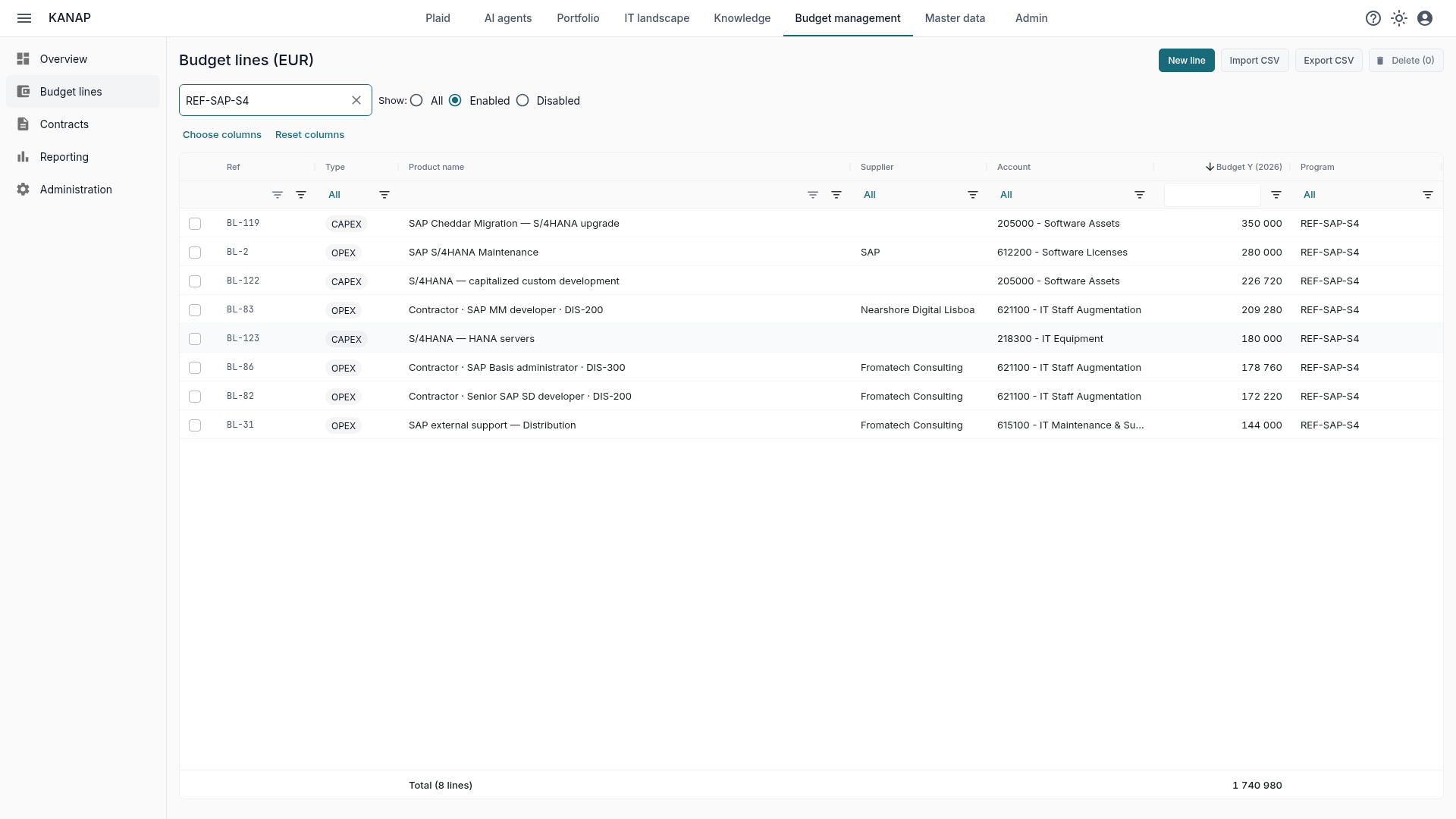
The OPEX or CAPEX type drives a few fields of the line:
- Accounts: each account of the chart of accounts serves OPEX, CAPEX or both. A CAPEX line only sees capital accounts.
- Analytics dimensions: a dimension or a value can be kept for one type (see below).
- Chargeback: the chargeback and analysis reports offer OPEX, CAPEX or both.
- Freezes: a budget column is frozen per year and per type. An approved capital budget can be locked while the operating budget is still in preparation.
Dimensions, the shared language of IT and finance
Analytics dimensions classify lines for reporting, next to the accounting structure (the details are in Analytics dimensions: what security really costs IT). Each dimension answers one question. The right set of dimensions depends on each organization; here is an example drawn from good practice, for anyone to adapt.
No need to start from scratch! A new KANAP workspace starts with four recommended dimensions and their values (Cost pool, IT tower, Purpose and Priority). Each one can then be renamed, extended and set up as you see fit.
“What is this investment for?” The Purpose dimension: replacement, capacity, productivity, security, compliance, growth. Kept for CAPEX lines and made required, it ensures every new investment arrives classified, whether it is created on screen, loaded from a file, prepared by Plaid or sent through the API. No more chasing a forgotten column.
“What can’t we cut?” The Priority dimension: mandatory, high, medium, low. It is what structures the trade-offs in committee. At Fromage & Co, our sample company, mandatory investments weigh €1.13M out of €2.34M in 2026: the S/4HANA migration, the data center refresh and the plant network segmentation.
“What does this program cost, all in?” A Program dimension, created in seconds, used by OPEX and CAPEX alike, with one value per program. The Fromage & Co S/4HANA program brings together €984k of maintenance, contractors and support in operating spending and €757k of investment (integration, capitalized development, HANA servers): €1.74M for the year, in a single report. When the program ends, the value is disabled: it stays on the lines and in past reports, and is no longer offered.
“What kind of spending is it?” Cost pool and IT tower, from the TBM model (Technology Business Management), shared by both types. A value can be kept for one type: internal labor, for example, for OPEX only.
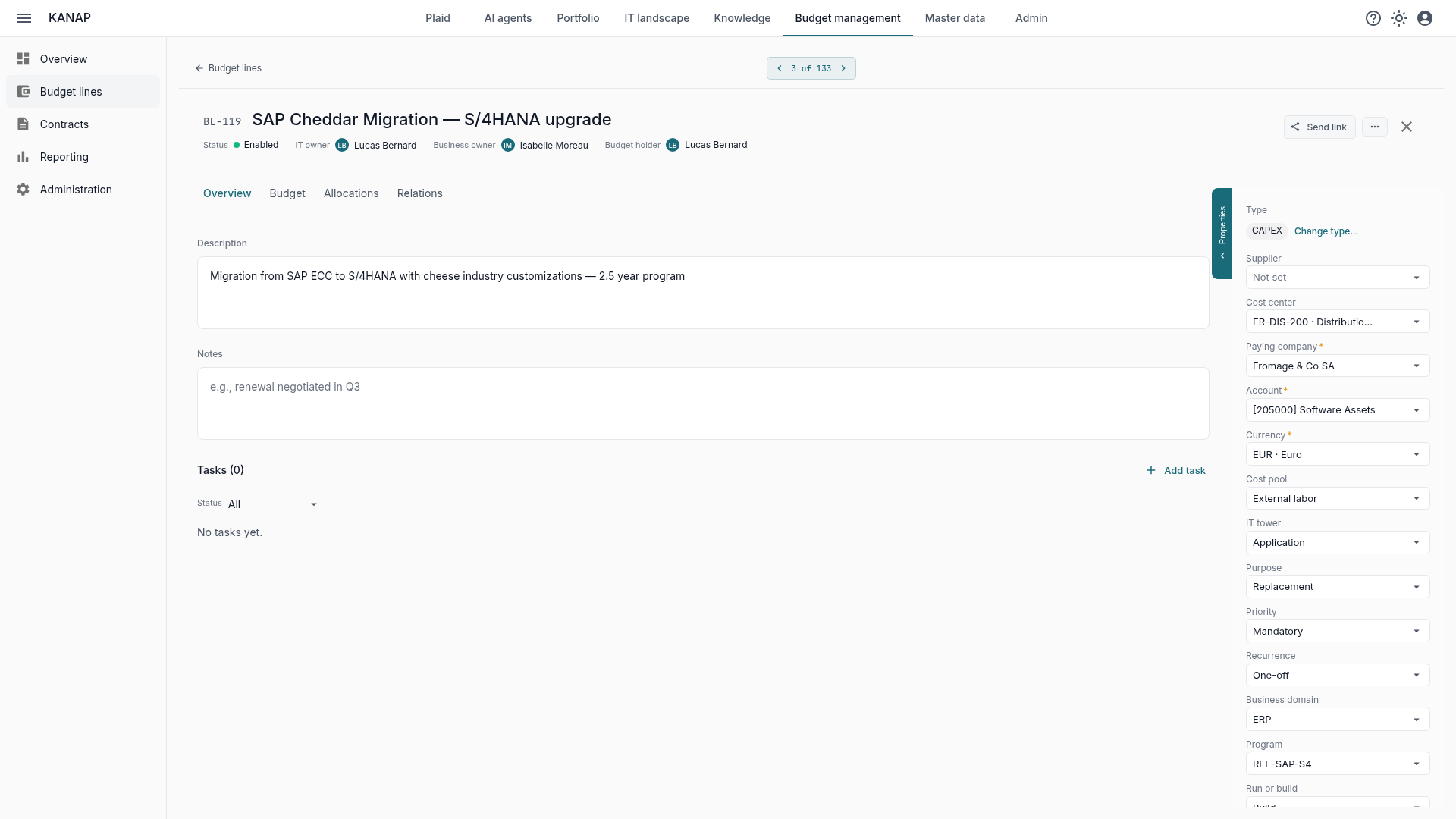
The link with accounting goes through the accounts, set per type, and the group’s consolidation accounts. Dimensions remain a tool for reading and analysis: they leave accounts and allocations untouched.
IT gains a classification that happens as lines are entered, and finance gains rules that enforce themselves. A dimension can be renamed, reordered or given an end-of-validity date without losing history, and the audit log keeps track of the changes.
Reports: All, OPEX or CAPEX
Eight reports open on three tabs, All, OPEX and CAPEX: top lines, top increases and decreases, budget comparison, budget column comparison, consolidation accounts, analytics dimensions, headcount by month and cost per FTE.
Filters combine: cost center, run or build, and one value per dimension. The 2026 CAPEX grouped by purpose, the cost of a program on the All tab, only the mandatory investments of one subsidiary: each view takes a few clicks.
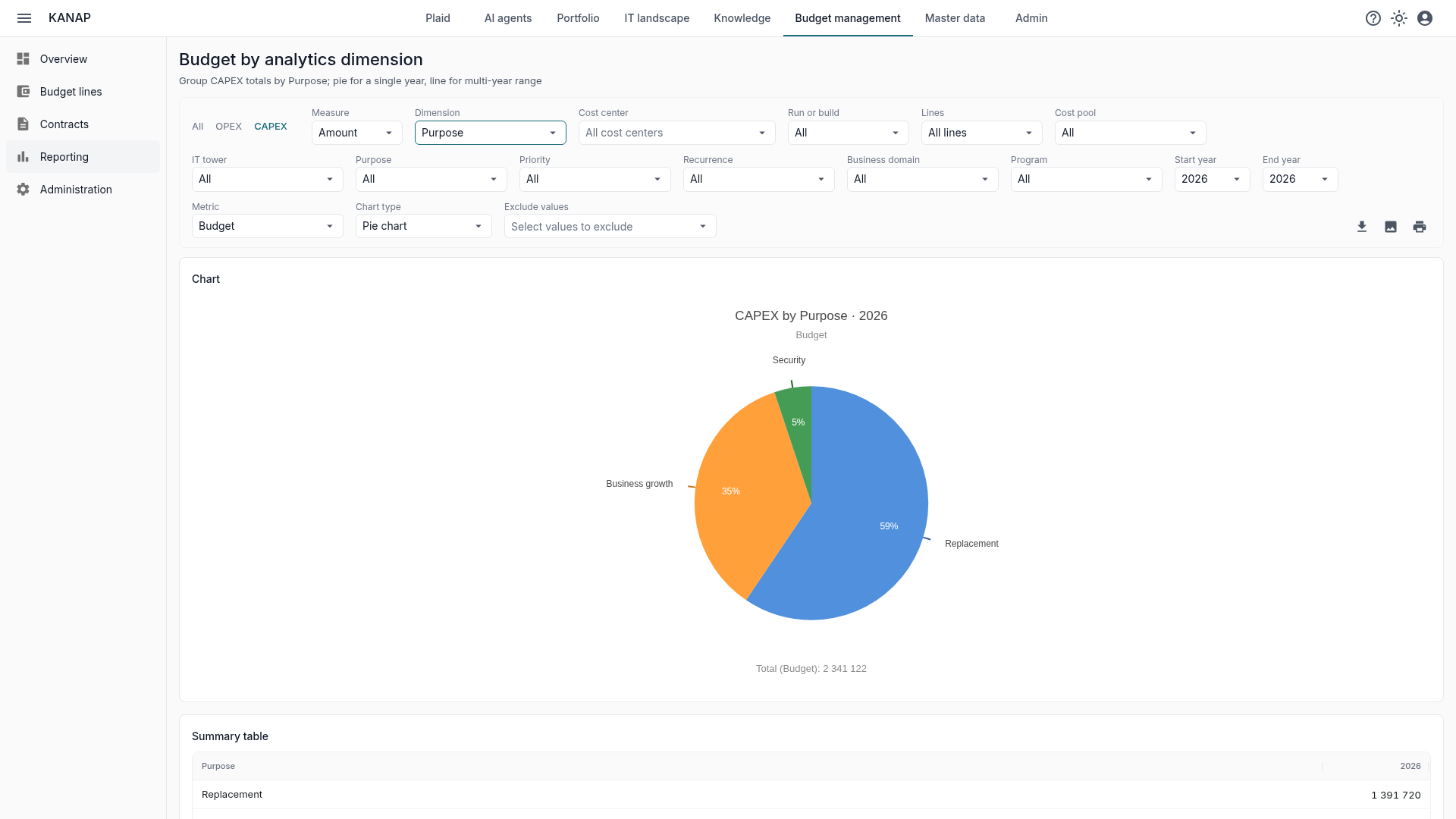
In the example, replacement accounts for 59% of the 2026 investment, growth for 35% and security for 5%. It is the kind of figure that gives real visibility, all the more when it can be compared from one year to the next. And here it is, one click away.
The page address holds the type and the filters. The link sent to the financial controller opens exactly the same view; the PDF export shows the same content. The chargeback reports also offer OPEX, CAPEX or both; CAPEX counts there for its amount of the year.
Finally, all this data can feed custom reports built by your favorite AI tool, connected directly to KANAP.
When spending changes type
A service turns out to be capitalizable, an investment turns back into operating spending. On the line, Change type… makes the change cleanly:
- From the line’s first year, the line itself changes type. It keeps its reference, budgets, allocations and links.
- From a later year, the line ends on December 31 of the previous year and keeps its history. A new line of the other type takes over, with the links to applications, contracts and projects. The two lines stay connected: “Replaced by” on one side, “Follows” on the other.
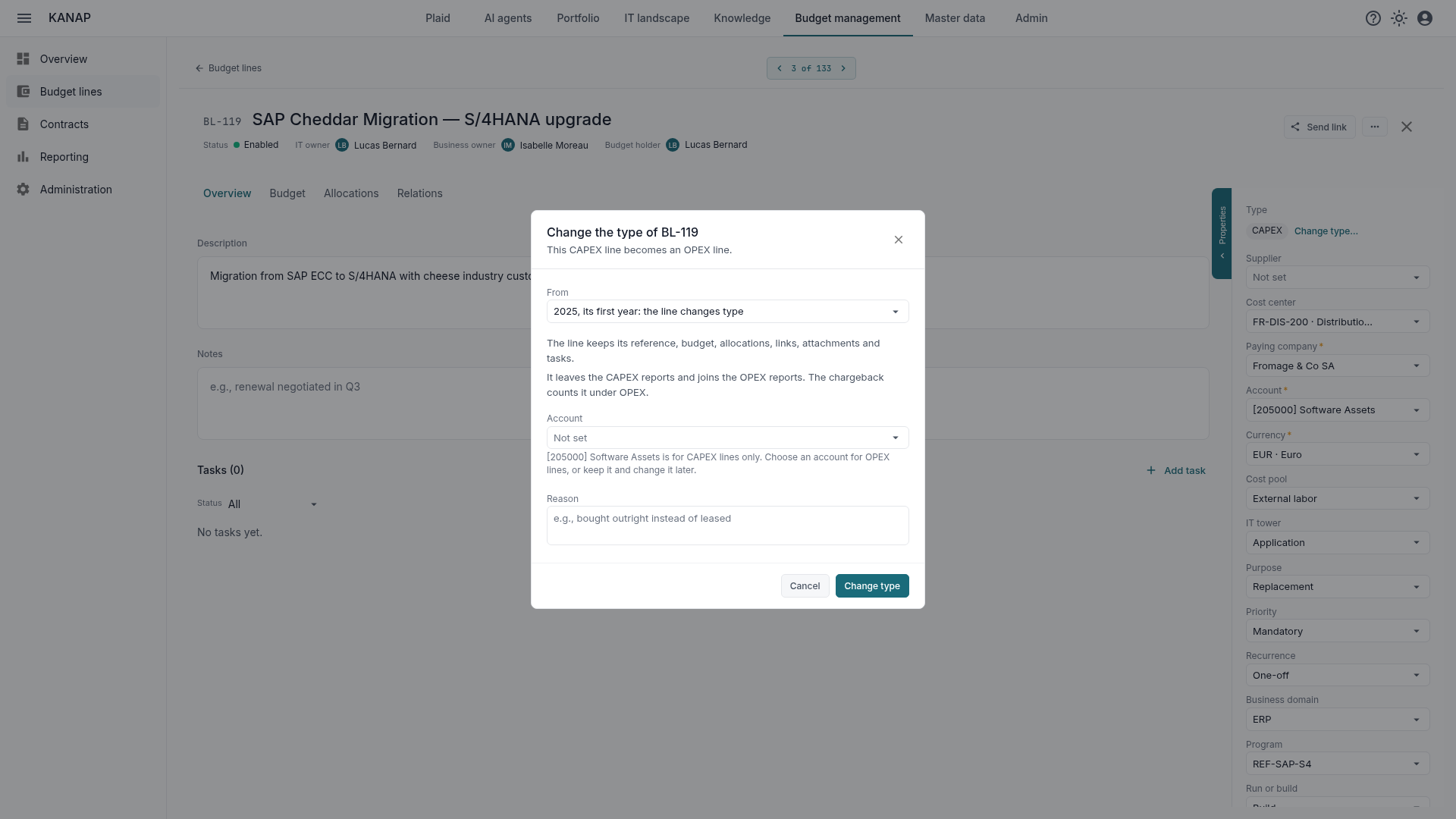
The window offers an account that suits the new type, and asks for that type’s required dimensions when there are any. The reason for the change goes to the audit log. A frozen budget stays intact: the change is refused while a frozen column holds amounts on the years concerned.
What KANAP does not do
KANAP does not compute depreciation and does not keep the fixed asset register: that is the job of accounting and the ERP. KANAP prepares and tracks the IT budget, OPEX and CAPEX, classified the way finance asks.
Where to start
- Start from finance’s questions: the ones that come back at every budget review. Each will become a dimension, or a filter of an existing report.
- Adjust the recommended dimensions: rename what needs it, add the ones you are missing (a Program, for example), keep for CAPEX what only concerns investment, and make the essential dimensions required.
- Go over the existing lines to fill in the dimensions still empty. Under each required dimension, KANAP counts the lines without a value and opens their list in one click.
- Check the result in the reports before the review: what is still “Unassigned” shows what remains to classify.
To see all of this on a budget already classified, a free 14-day trial of our hosted version gives access to the sample data of the fictional Fromage & Co group, loaded in a minute. KANAP is fully open source: it can also be installed for free on your own servers.