
Building next year's IT budget
Next year's budget from the expected landing: copy what does not change, preview the copy, then rework only the lines that matter.
Part 1 was a targeted review: the 2026 landing now reflects the main movements, and 2027’s major changes are already recorded. What remains is every line where nothing changed. Finding and retyping them one by one is the most thankless job of budget season. In KANAP, it is one tool and a few clicks.
The two passes
In Budget management > Administration, open “Copy budget columns”. The All tab, the default, copies OPEX and CAPEX lines together; OPEX or CAPEX keeps one type. The tool copies one budget column to another, from one year to another, with an optional percentage adjustment.
First pass: complete the 2026 landing. Source: Budget 2026 (or Revision, or Actuals, depending on your practice - copies can be chained, for example Actuals first, then Revision). Destination: Expected landing 2026. The lines reviewed in part 1 already have a value; the tool ignores them and fills only the empty cells.
Second pass: build the 2027 budget. Source: Expected landing 2026. Destination: Budget 2027, with “Percentage increase” set to whatever rate absorbs your price increases. Your manual entries from part 1 stay untouched.
Preview first
Your work is precious. So Copy stays disabled until a preview has run. The preview lists every line with its source value, its current destination value and the value after the copy. Lines already filled in appear marked “Skipped: the destination has amounts”: they will not be modified. The “Overwrite existing data” switch covers the deliberate cases; leave it off unless you mean it.
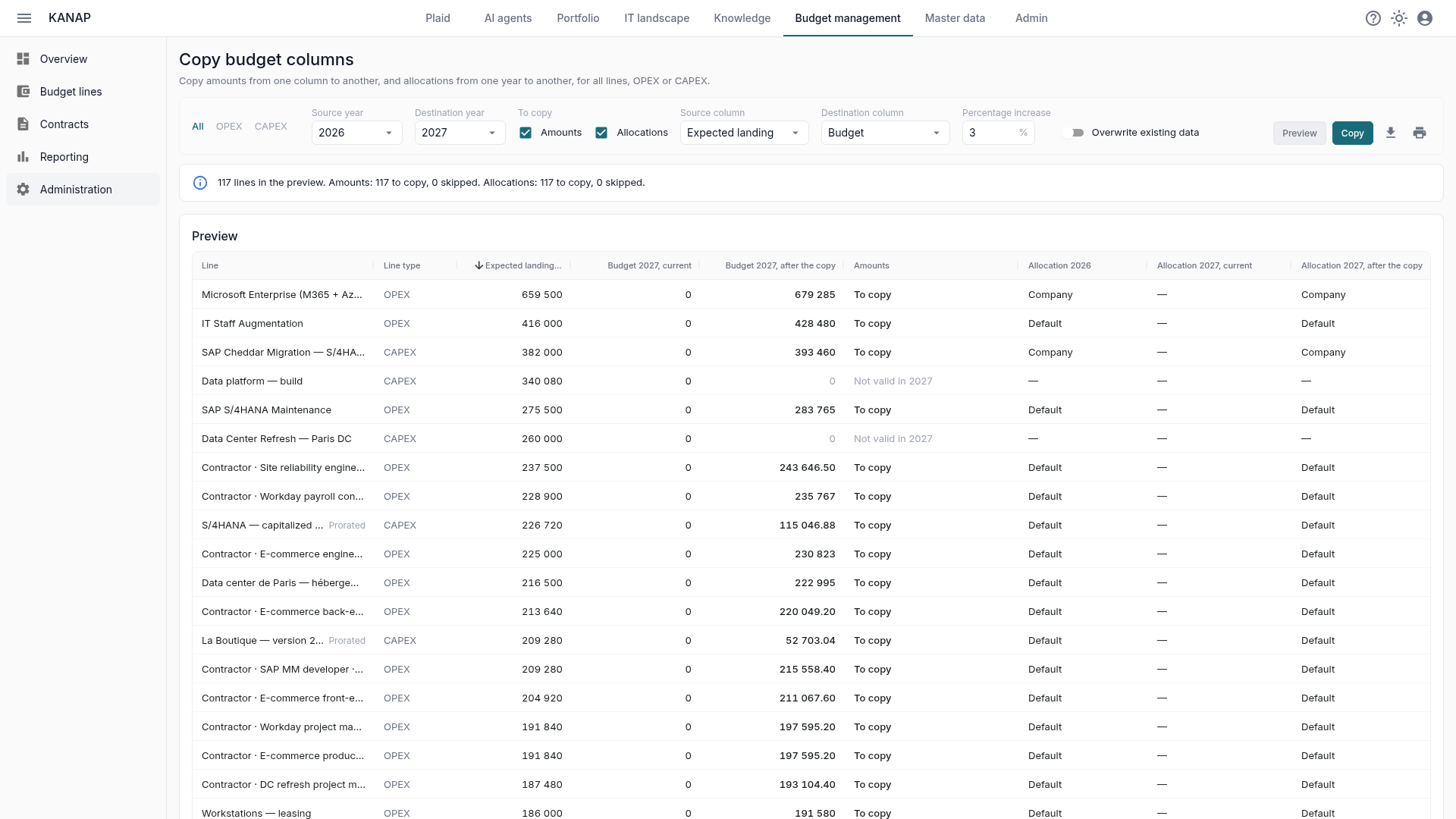
A banner sums up the preview, and the totals under the table give the source, the current destination and the total after the copy. A number surprises you? Nothing has been written yet. Adjust, preview again, copy.
The copy also follows each line’s validity. A line that ends in June 2027 receives only six months, marked “Prorated” in the preview; a line not valid in 2027 is left out (“Not valid in 2027”).
Lines in quantity × price
For a line computed from its quantity and price lines (see part 1), the percentage does not apply to the amount but to each line’s unit price. Quantities stay, periods move forward one year, and every month is recomputed with 2027’s working days. Two consultants at €650 a day with +3% become two consultants at €669.50 a day in 2027, on a calendar that counts its own public holidays.
The total can therefore differ slightly from “source + 3%”: that is deliberate, next year does not have the same number of working days. FTEs are recomputed along the way.
Allocations follow
If you run internal IT chargeback, every line carries its allocation rule: headcount, IT users, turnover, or a manual split. Exactly the kind of thing that becomes unmanageable in Excel. The same copy carries them: under To copy, Allocations is ticked next to Amounts when the years differ, so the second pass rolls the rules to 2027 with the numbers, preview included. The “who pays what” follows the numbers with no retyping.
What about CAPEX?
Budget columns work the same for investments, and so does the copy: same tool, same preview: on the All tab, investments roll forward with operations in the same run. An investment plan is often decided project by project, but recurring investments (hardware refresh, keeping systems current) roll forward this way in one pass.
What’s next
The 2027 budget is complete: the known changes were entered by hand, everything else was rolled forward with inflation built in. Part 3 moves on to the presentation: the reports for the budget meeting, chargeback by company, then freezing the approved figures.