
IT contract management in KANAP
Computed deadlines, recorded renewal decisions, commitments compared with the budget: IT contracts under control in KANAP.
Who has never let a contract slip past its cancellation deadline? The negotiation that follows is rarely pleasant. And indeed, it is not easy to keep track of dozens of contract deadlines, of contracts on tacit renewal or simply of subscriptions. These dates often live in signed PDFs, in a spreadsheet or with procurement.
In KANAP, every date is computed from the contract. Every deadline reaches the right owner, with time to decide. And every contract compares easily with the budget, which makes anomalies easy to spot.
Data entry: just a few fields
A contract is created in a single form. Five fields are required: the supplier, the company that signed, the start date, the duration of a term and the currency. You then add the owner, the tacit renewal, the notice period, the yearly amount and the billing frequency.
KANAP computes the rest: the successive terms, the cancellation deadline of each one and the state of the contract. Change the duration or the notice period, and every date follows.
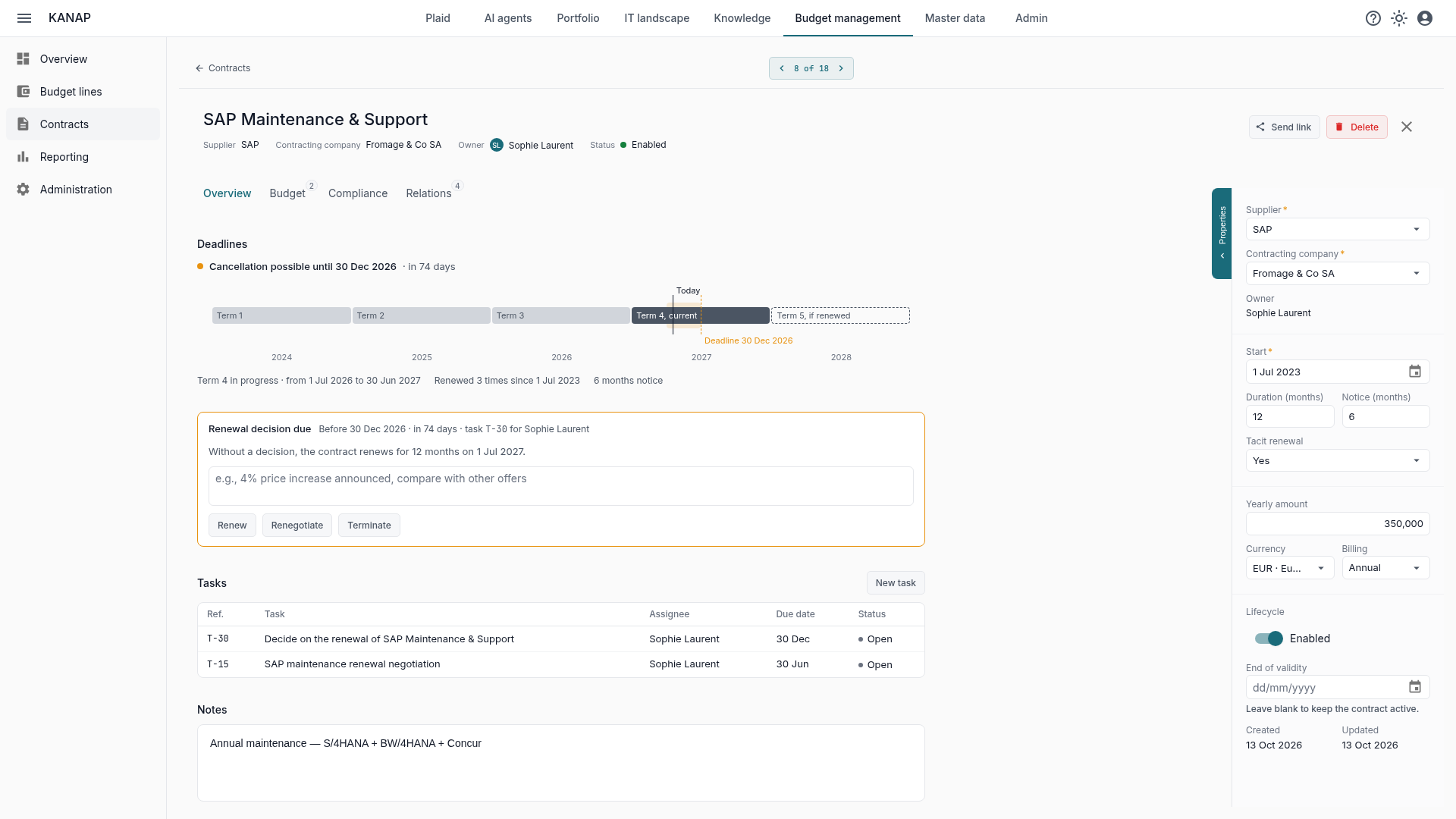
At Fromage & Co, our sample company, SAP maintenance costs €350,000 a year. It runs from July 1 to June 30, with six months’ notice and tacit renewal. KANAP works out that it can be cancelled until December 30, 2026. After that day, it renews until June 2028.
The contract overview says it in one sentence: “Cancellation possible until 30 Dec 2026 · in 74 days”. A timeline shows the past terms, the current term and the next deadline. The following term stays dotted as long as it can still be avoided. A line of facts recalls how long the contract has been renewing.
A register kept in a spreadsheet loads or exports as a CSV file. The preflight check validates the file before anything is saved.
The list: what comes next, in order
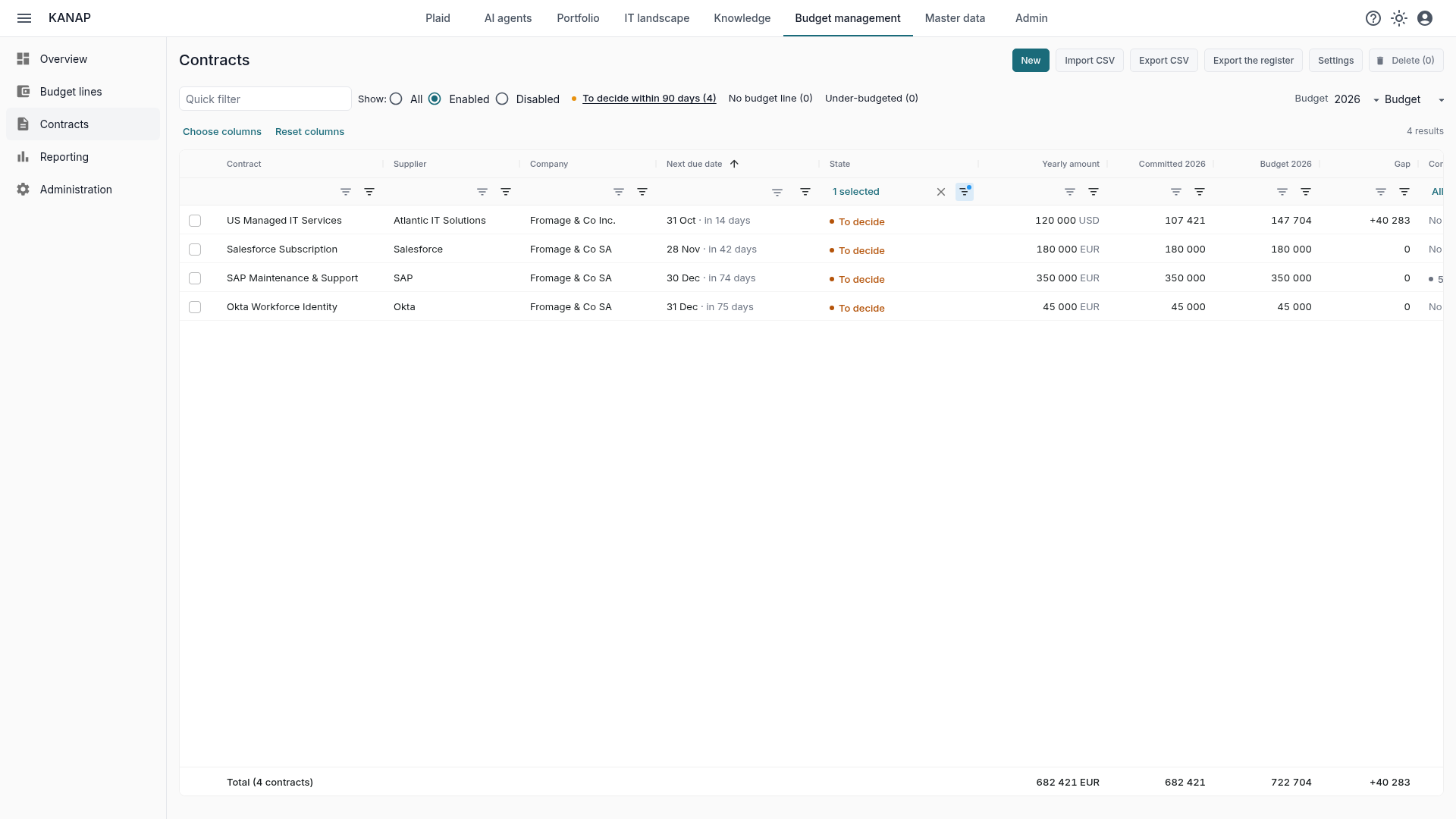
The contract list sorts by Next due date, soonest first. For a contract that renews tacitly, that is its next cancellation deadline; for the others, its end. Each date is followed by “in n days”.
The State column says where each contract stands:
- To decide: a decision is due before the deadline;
- Ends without renewal: the contract is in its last term;
- Renewed on a date: the notice has passed, the next term is a given;
- In progress: nothing is due yet;
- Expired: the contract has ended.
The To decide within 90 days quick filter isolates the contracts that need a decision. At Fromage & Co, there are four today: the managed IT services in the United States (deadline October 31), Salesforce (November 28), SAP (December 30) and Okta (December 31). The 90-day window can be set from 0 to 365 days.
“Renewed on” shows what is already settled. The Microsoft agreement, the VMware license and the Orange network have passed their notice: they start a new term on January 1. Better to know it while preparing the budget.
The decision: renew, renegotiate, terminate
Beyond the list, KANAP asks the owner to decide and keeps a record of the decision.
So, 90 days before the cancellation deadline (a configurable window), KANAP creates a task for each contract awaiting a decision. It is assigned to the contract owner, due on the cancellation deadline. Hence the importance of an owner on every contract.
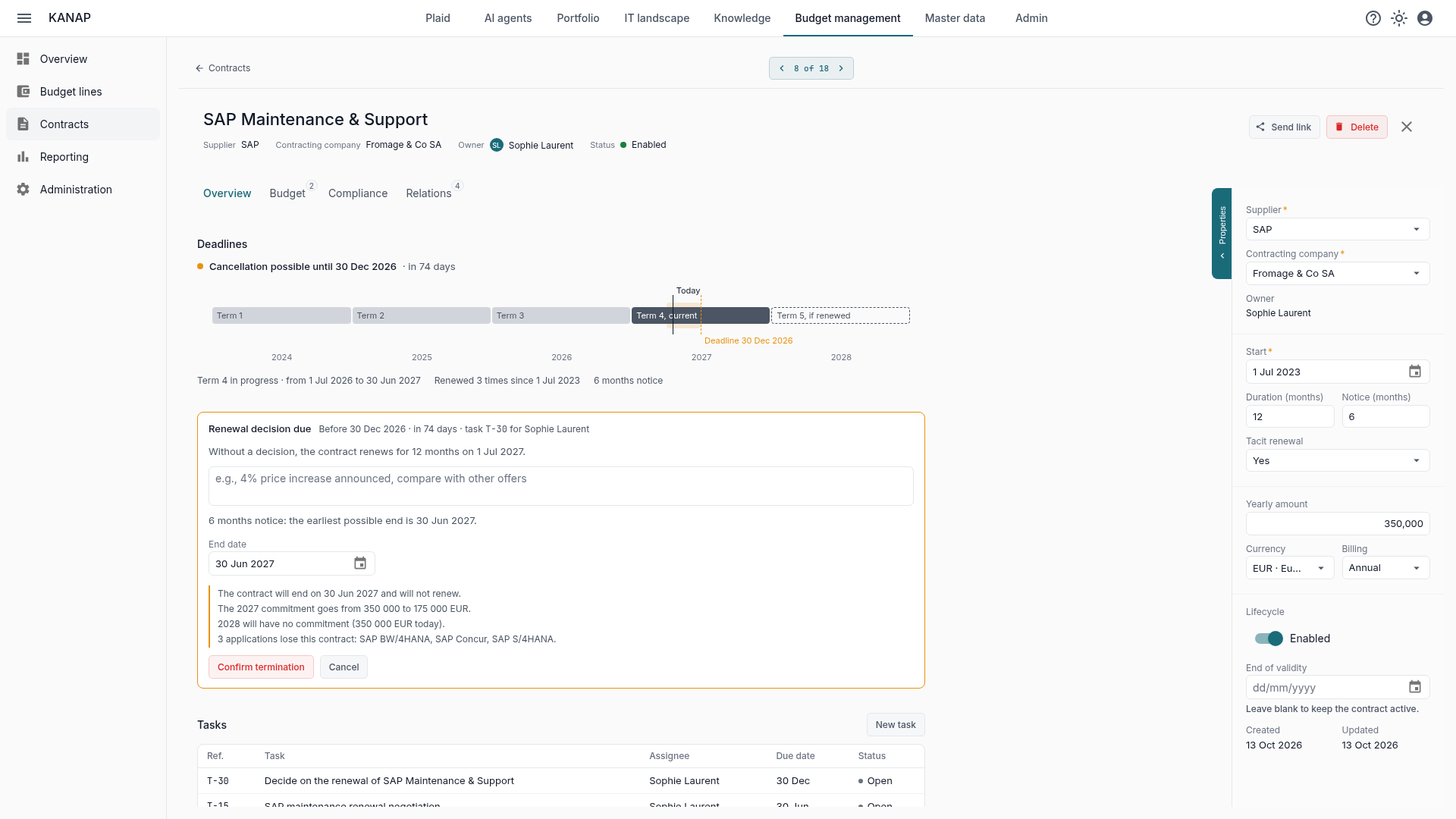
On the contract page, a box says what happens if nobody acts: “Without a decision, the contract renews for 12 months on 1 Jul 2027.” The owner then chooses:
- Renew: the renewal is confirmed for this term, and the task closes.
- Renegotiate: the task stays open until the final decision, and the box reads “Renegotiation in progress”.
- Terminate: KANAP proposes the earliest end the notice allows. For SAP maintenance, that is June 30, 2027. An earlier date remains possible, with a warning: the supplier has to agree to it.
Before a termination is confirmed, the box lists its consequences: the commitment of the year and the next, the applications that lose this contract, the assets that lose their support contract. In the SAP example, the 2027 commitment drops from €350,000 to €175,000, and the 2028 commitment falls to zero.
Every decision is recorded: who, when, with what justification. “Renewal confirmed on 2 Oct 2026 by Sophie Laurent”, for example. A decision taken too quickly can be undone as long as the deadline has not passed. After a termination, KANAP reminds you to send the letter before the deadline and to attach it to the contract.
The contract against the budget
The contract says what IT has committed to pay. The budget says what it has planned. KANAP compares the two, year by year.
Committed is the contract’s yearly amount spread over the months a term covers, prorated by days. The following years assume the renewal goes on until it is stopped. Nothing is committed after the contract ends.
Budget sums the budget lines linked to the contract, for the chosen year and column: the budget, the expected landing, or next year’s budget in the middle of its preparation. Gap is the difference, in orange when budget is missing.
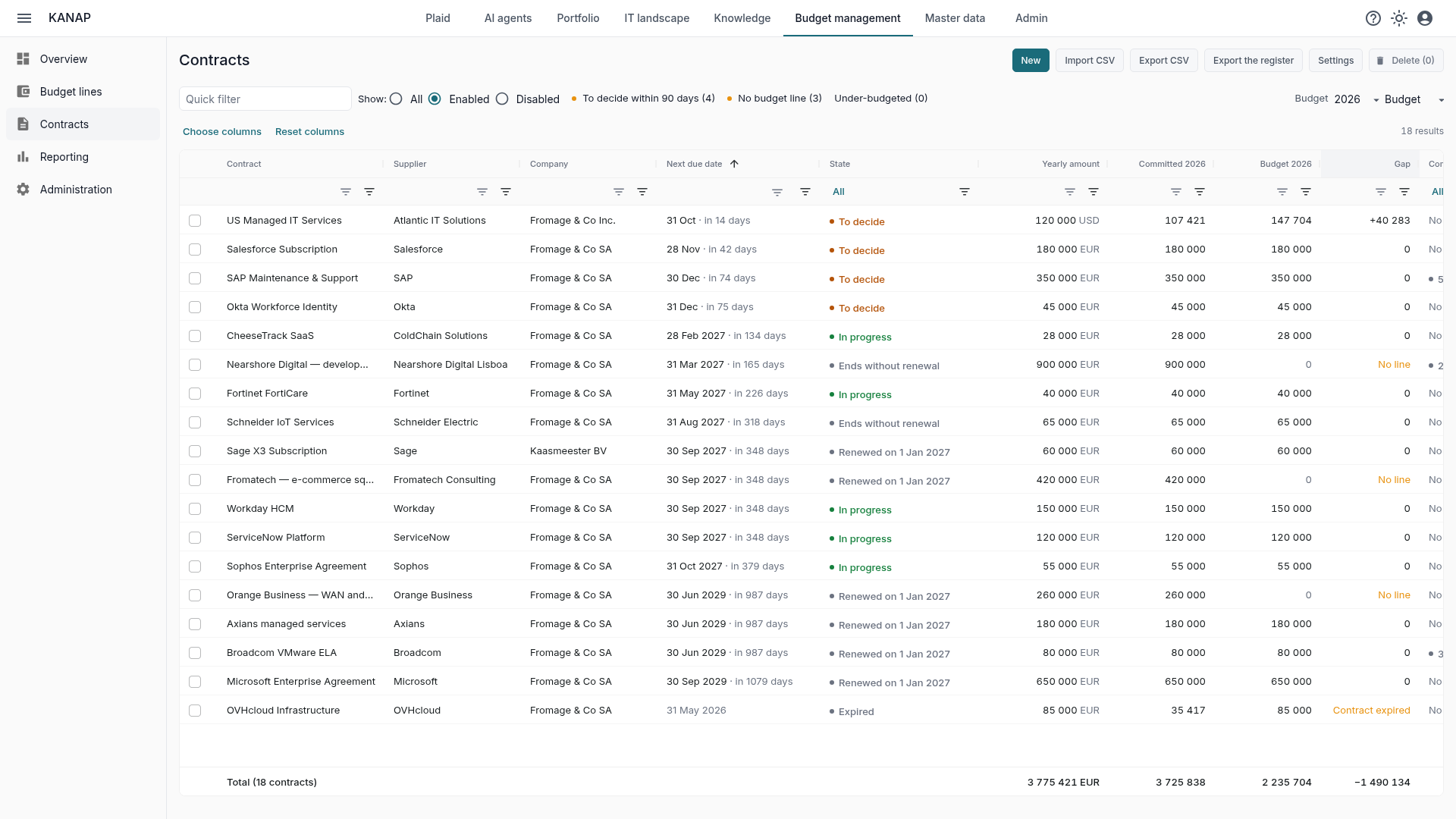
Each contract gets a coverage state: covered, under-budgeted, budget above the contract, no budget line, no commitment, or budget not started yet. Two quick filters isolate what needs action: No budget line and Under-budgeted.
On the 2026 budget of Fromage & Co, the contracts commit €3.73M. Three of them are linked to no line: the nearshore team in Lisbon, the Fromatech e-commerce team and the Orange network, or €1.58M of commitments to tie back to the budget. In the expected landing, four contracts are under-budgeted, including SAP maintenance. Conversely, the OVHcloud contract ended in May and its line still holds budget.
The link works both ways. The contract’s Budget tab shows its lines and their coverage over three years. A budget line leads to its contract. A simple way to avoid oversights!
The clauses a contract must contain
A contract covers applications, and those applications point to clauses it must contain. Personal data calls for a GDPR data processing agreement and the data location. A critical application calls for a reversibility clause, an exit plan and an audit right. The contract’s Compliance tab lists these points based on how the application has been classified. Each one is recorded as present, missing or not applicable, and the compliance register exports to CSV. We will come back to it in more detail in a coming article.
What KANAP does not do
KANAP does not draft or sign contracts, and does not run the negotiation: that is the job of procurement and legal. The amount at signature applies to every term: an indexation or a price increase is budgeted on the linked lines. KANAP keeps the register, the deadlines, the decisions and the link with the budget.
Where to start
- Load the existing register from a CSV file, after the preflight check, or create your contracts by hand.
- Name an owner on every contract: they will receive the decision tasks.
- Link the budget lines, starting with the largest contracts. Then look at No budget line and Under-budgeted for the year you are preparing.
- Start the week with To decide: no deadline goes by without a decision.
To see all of this on contracts already entered, a free 14-day trial of our hosted version gives access to the sample data of the fictional Fromage & Co group, loaded in a minute. KANAP is fully open source: it can also be installed for free on your own servers.