
Your hardware inventory already exists, and it is in Netbox
The infrastructure team keeps Netbox current. KANAP reads it, keeps its asset records in step without retyping, and adds what Netbox does not know: applications, contracts, costs.
Tuesday, 2:40 a.m. Monitoring reports that PAR-ESX-04R has stopped answering. The on-call engineer opens the asset file and looks for the server: no row by that name. The machine was renamed last month, and the file still says PAR-ESX-04.
It takes twenty minutes and two phone calls to find out which applications ran on it, under which maintenance contract, and which number to call at the manufacturer.
The right name was recorded somewhere. The infrastructure team changed it in Netbox the day of the rename, the same way they record every rack, every address and every serial number there.
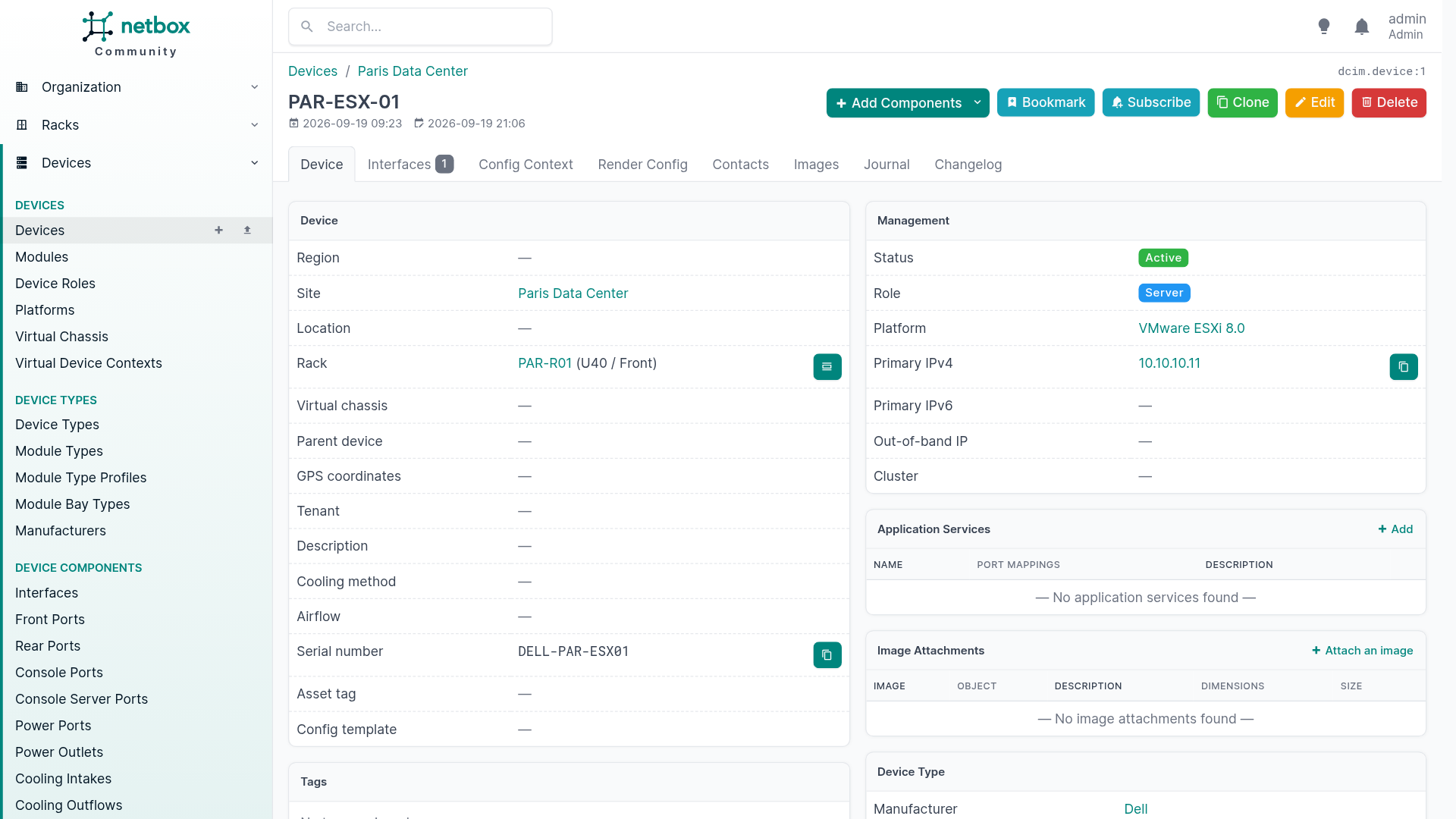
The inventory and the business layer
Netbox says where a machine sits and how it is wired: site, rack, unit, serial number, address, platform. It does that very well, and that information deserves to be typed once.
IT management needs other answers. Which applications run on this server? Which contract covers it, and until when? What does it cost, and on which budget? Which incident hit it last month? Those questions sit outside Netbox’s scope.
In KANAP, the asset record brings those answers together: hosted applications, contracts, OPEX and CAPEX items, incidents, tasks. The Netbox synchronisation gives it a reliable identity. It creates asset records from Netbox and keeps them current, and the inventory stops being retyped.
Every field has one owner
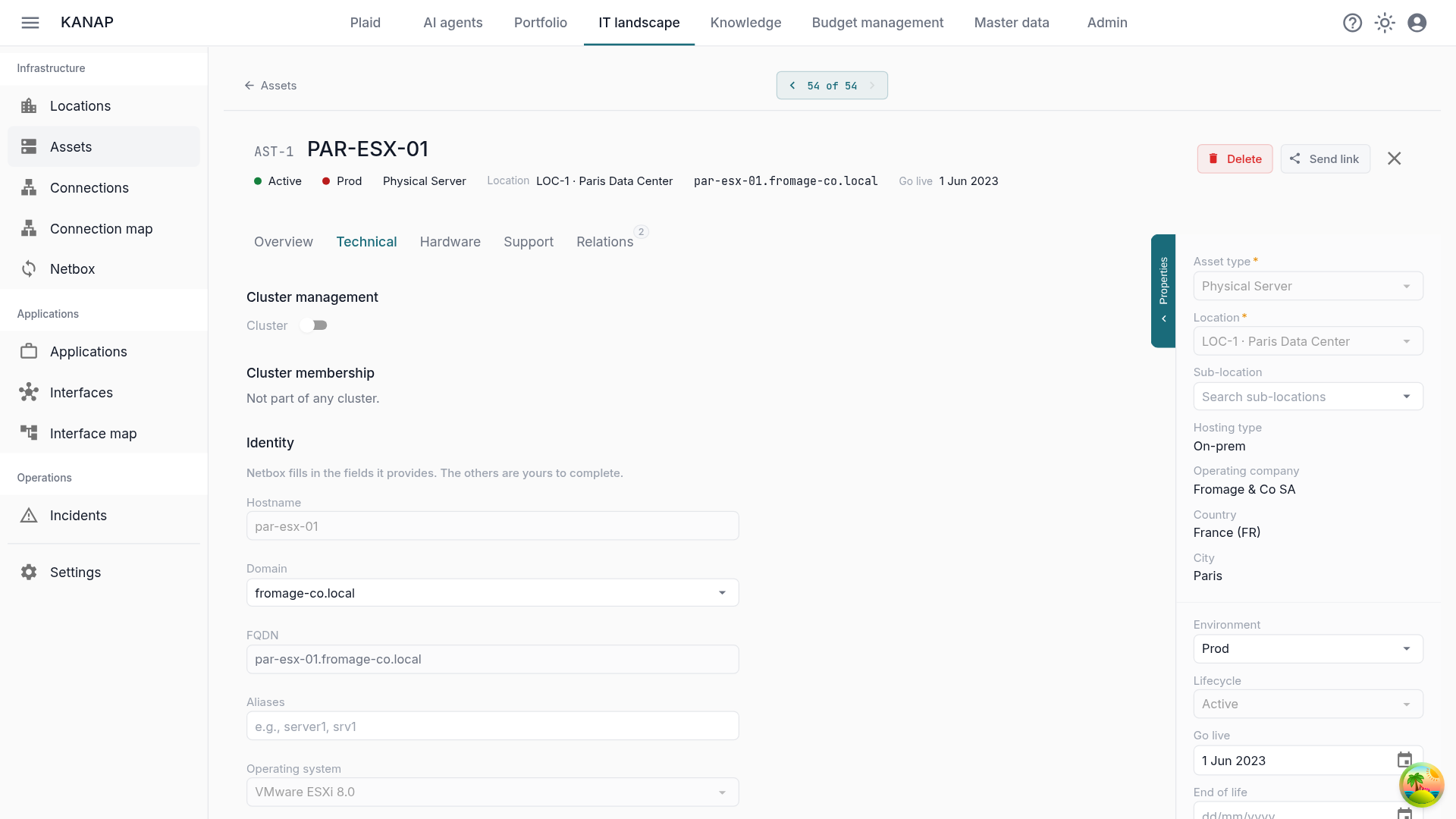
Two registers always drift apart when the same information can be edited on both sides. So the rule is strict: the fields Netbox fills in are governed by Netbox, and locked in KANAP. The rest of the record is yours.
| Managed by Netbox | Stays yours in KANAP |
|---|---|
| Name | Environment |
| Host name and domain | Notes and description |
| Serial number | Dates, support and warranty |
| Manufacturer and model | Contracts and costs |
| Rack and rack unit | Applications hosted on the asset |
| Primary IP address | Connections and other relations |
| Operating system | Attachments, tasks, incidents |
| Lifecycle status | Everything else on the asset |
| Location and sub-location |
The lock covers only the fields Netbox fills for that object. A device with no platform in Netbox keeps an open operating system field. You complete it in KANAP and your value stays: a synchronisation writes only the values Netbox provides.
KANAP reads Netbox with a read-only API token. The infrastructure team keeps its tool as it is.
Your asset register also covers what Netbox does not describe, such as an EC2 instance or a managed database. Those assets live in KANAP next to the others, with no alert.
Choosing what comes in
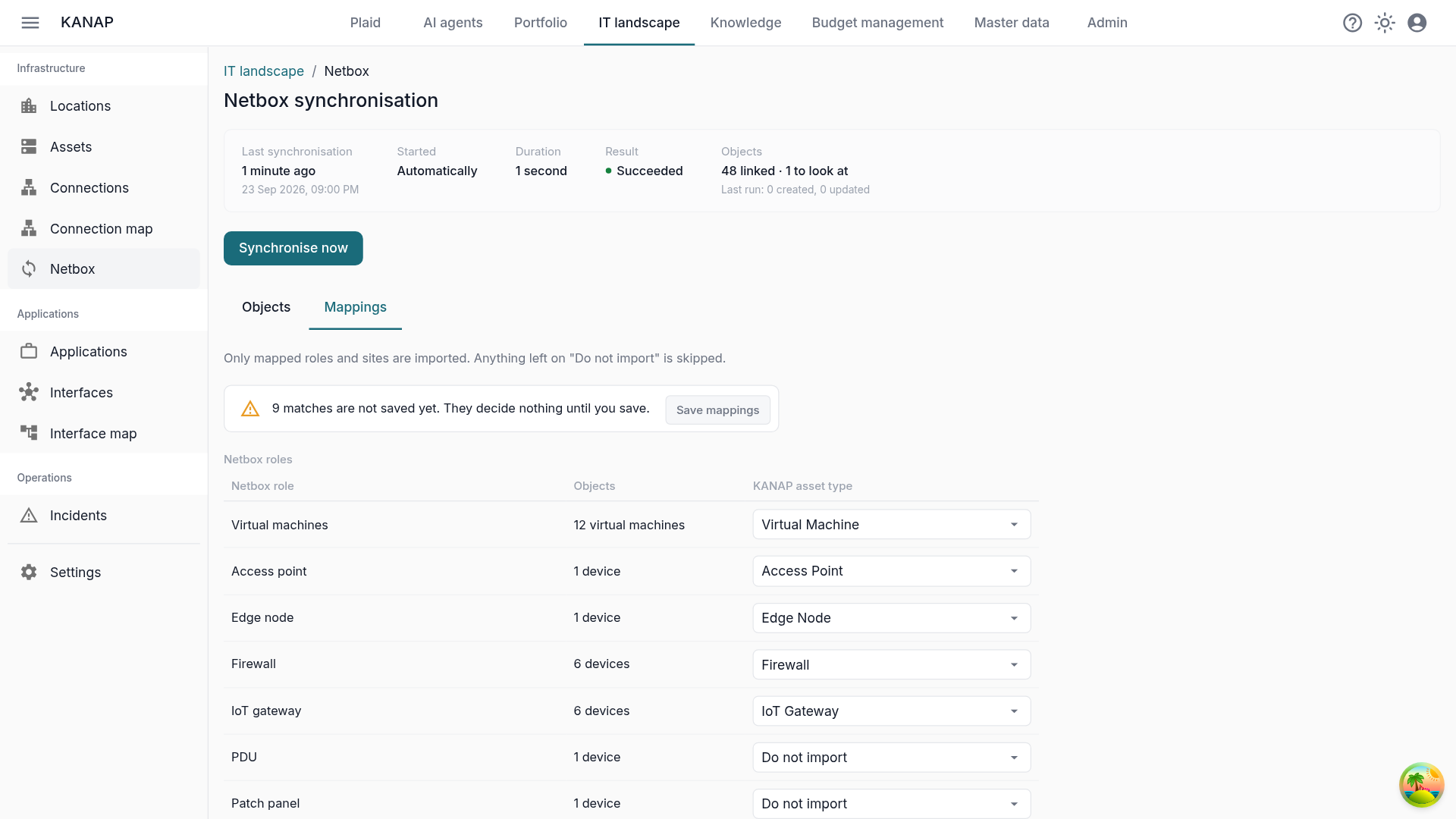
The Mappings tab sets the scope, in three tables.
- Roles. Each Netbox role gets a KANAP asset type, or Do not import. The servers come in, the PDUs and patch panels in the same rack stay out. All virtual machines go through a single row.
- Sites. Each Netbox site gets one of your locations. Its top-level Netbox Locations become sub-locations automatically.
- Operating systems. Each Netbox platform is matched with an operating system from your catalogue: “Debian 12” in Netbox becomes “Debian 12 (bookworm)” in KANAP.
Each row shows how many objects it covers, so you see the reach of a choice before you make it. KANAP pre-fills what it recognises, and your choices apply once saved with Save mappings.
The first synchronisation, read line by line
The first run against a database that is already full is the delicate moment. Your assets exist in KANAP, sometimes under other names. The risk is twofold: duplicates when matching fails, and above all a wrong link, which would let Netbox overwrite the record of another machine.
KANAP tries four things, in order, and stops at the first one that finds anything: an existing link, the serial number, the host name, the name. When a step finds several assets, the object goes to To decide with the candidates.
Two signals only produce a suggestion: a name that starts the same way, and an IP address an asset already holds. Addresses get reused, shared between cluster members, or simply go stale. The object then waits under To decide with the suggested asset, and one click confirms it.
Every uncertain match goes through you.
Synchronise now opens Review before applying. The preview sorts everything: creations, field-by-field updates, decisions to take, objects out of scope, objects gone from Netbox. You correct it in place: link an object to an existing asset, create a new one, or leave it out for good.
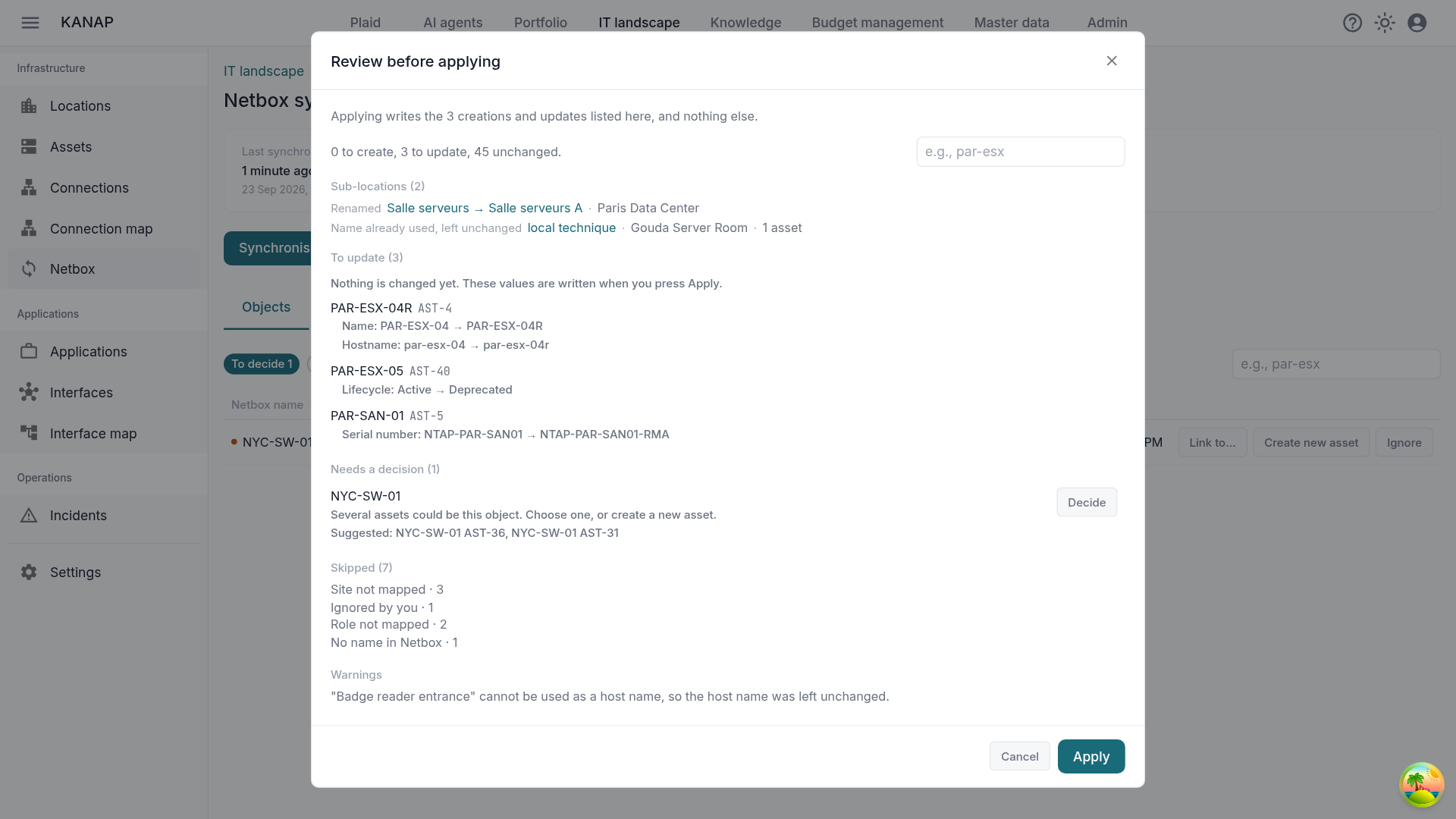
On a large estate, the review moves in batches of 500. Apply this batch writes exactly what the preview shows. The next batch waits for you to read it.
Then the estate lives
The second synchronisation tells you whether the tool can be trusted. It should be short: it shows only what changed.
- A machine renamed in Netbox takes one line, with the old and the new name. PAR-ESX-04 in the preview above is one.
- A Location renamed in Netbox appears once, and every device inside it follows.
- A server set to Decommissioning becomes Deprecated. An Offline or Failed status shows as a warning on the asset, and the lifecycle stays Active.
- A machine deleted from Netbox stays in KANAP with its contracts and its history. It moves to Missing from Netbox, and you decide yourself whether to mark it Retired.
- A managed field edited by hand in KANAP is put back in line at the next run.
Once two manual runs in a row are clean, the second with nothing left to change, turn on Automatic synchronisation. It runs every hour and applies changes directly. It starts after a first manual synchronisation applied without error, and pauses while a batch is still waiting to be read. Doubtful cases collect under To decide and wait for your decision.
Back to Tuesday night
With the synchronisation in place, PAR-ESX-04R exists in KANAP under its current name since the run that followed the rename. The on-call engineer finds it on the first try. Its record lists the applications running on it, with their environment. The Support tab gives the maintenance contract, the support tier, the expiry date and the manufacturer’s contacts with their phone numbers.
The lookup takes a minute, and the on-call engineer can focus on the outage.
In practice
The synchronisation works in the cloud and on-premise. In the cloud, KANAP has to reach your Netbox from the internet. If your Netbox lives on the internal network, the on-premise edition installs next to it, on your own infrastructure.
Netbox stays the reference for the equipment, and KANAP holds the business layer around it. The rest of the register is described on the IT landscape page.