
Technologies: the link between servers and applications
SQL Server, vSphere, Active Directory, Entra ID: what runs between your applications and your servers is missing from most IT registries. With a prefilled catalog, KANAP makes it the link that connects end of support, vulnerabilities, privileged access and costs.
We decide to move on from SQL Server 2016. First question: who depends on it? The list of applications does not say. The list of servers gives the operating system and stops there. What is left is to ask the teams, one by one, and hope nobody forgets a database installed six years ago.
The same question comes back in other forms. Entra ID goes down: which applications can no longer sign their users in? The vSphere contract is up for renewal: how much does it cost us, and for which servers?
What runs between servers and applications is the link missing from most IT registries. Here is how KANAP keeps it, without tedious data entry, and the benefits you can draw from it.
How things are classified
KANAP describes the information system with three types of objects:
- Applications: what the business works in. The ERP, the CRM, payroll, the intranet.
- Technologies: what IT runs or subscribes to so that these applications work. SQL Server, vSphere, Active Directory, Entra ID, Tomcat.
- Assets: where it runs. Servers, virtual machines, clusters, cloud databases.
The criterion is therefore simple: a technology is a product nobody works in, but whose failure brings down or exposes other applications. Entra ID runs on none of your servers, Active Directory runs on your domain controllers, SQL Server has one row per version in service: all three are technologies.
A catalog of 192 products, kept up to date
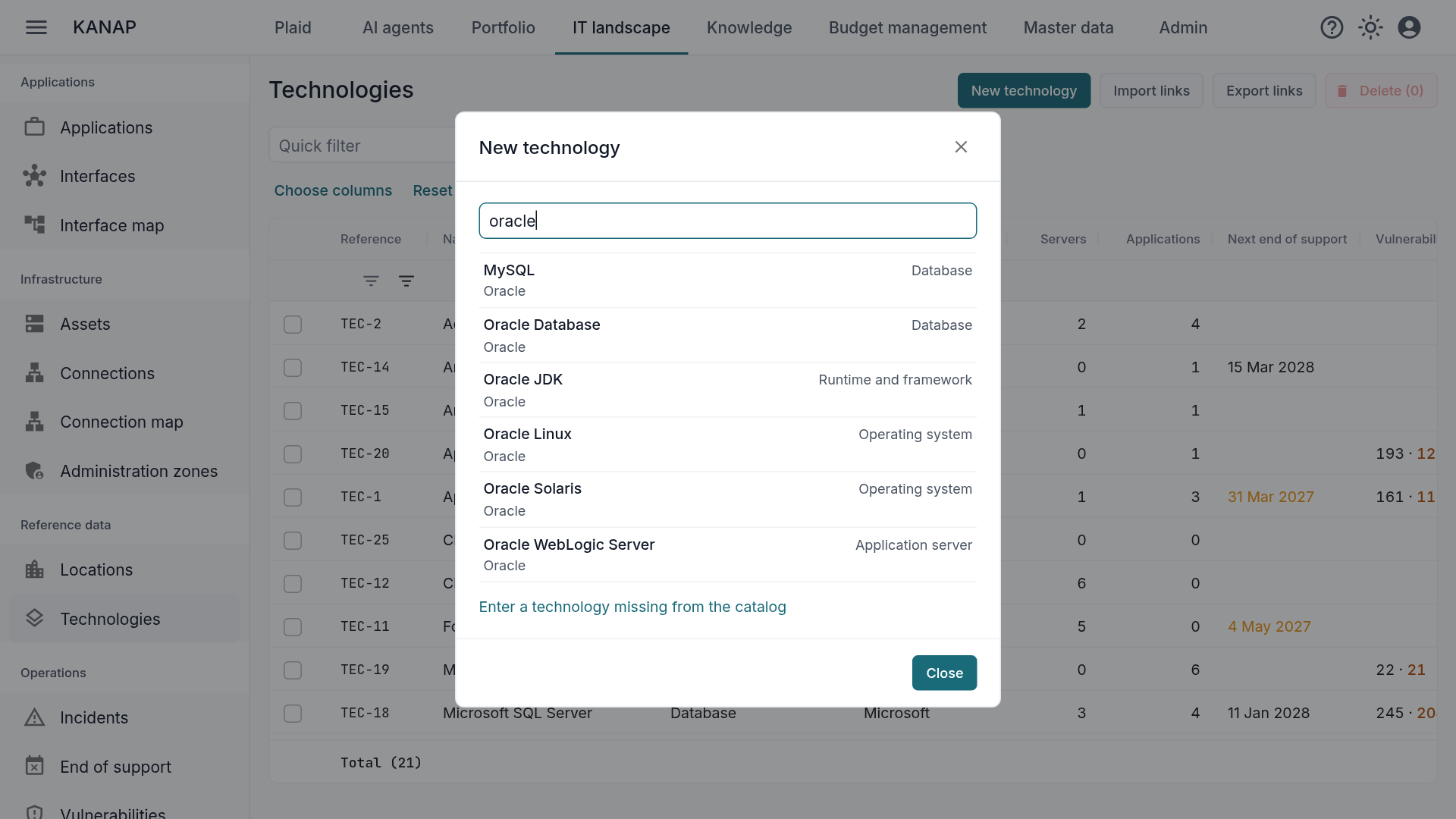
Creating a technology starts with the catalog. You search for the product and click: KANAP creates the technology with its vendor, family, hosting type, versions and their end of support dates, and adds its known vulnerabilities and a short description in your language.
Dates come from endoflife.date, the open reference for product lifecycles. For the products it does not cover, such as Cisco NX-OS, Juniper Junos, Dell PowerStore or WebLogic, KANAP takes the dates from the vendors’ official pages. Each version then shows its source and the day the date was checked.
An adopted technology stays up to date. In the hosted version, KANAP checks the catalog every day: a newly released version is added, a date moved by the vendor follows. What you entered by hand is kept, and a version you deleted is not recreated.
For the on-premise version, each new KANAP release brings the catalog updates, and you can still turn on the daily update from the internet if your environment allows it.
Finally, a product missing from the catalog can be created by hand; four fields are enough.
Versions and their status
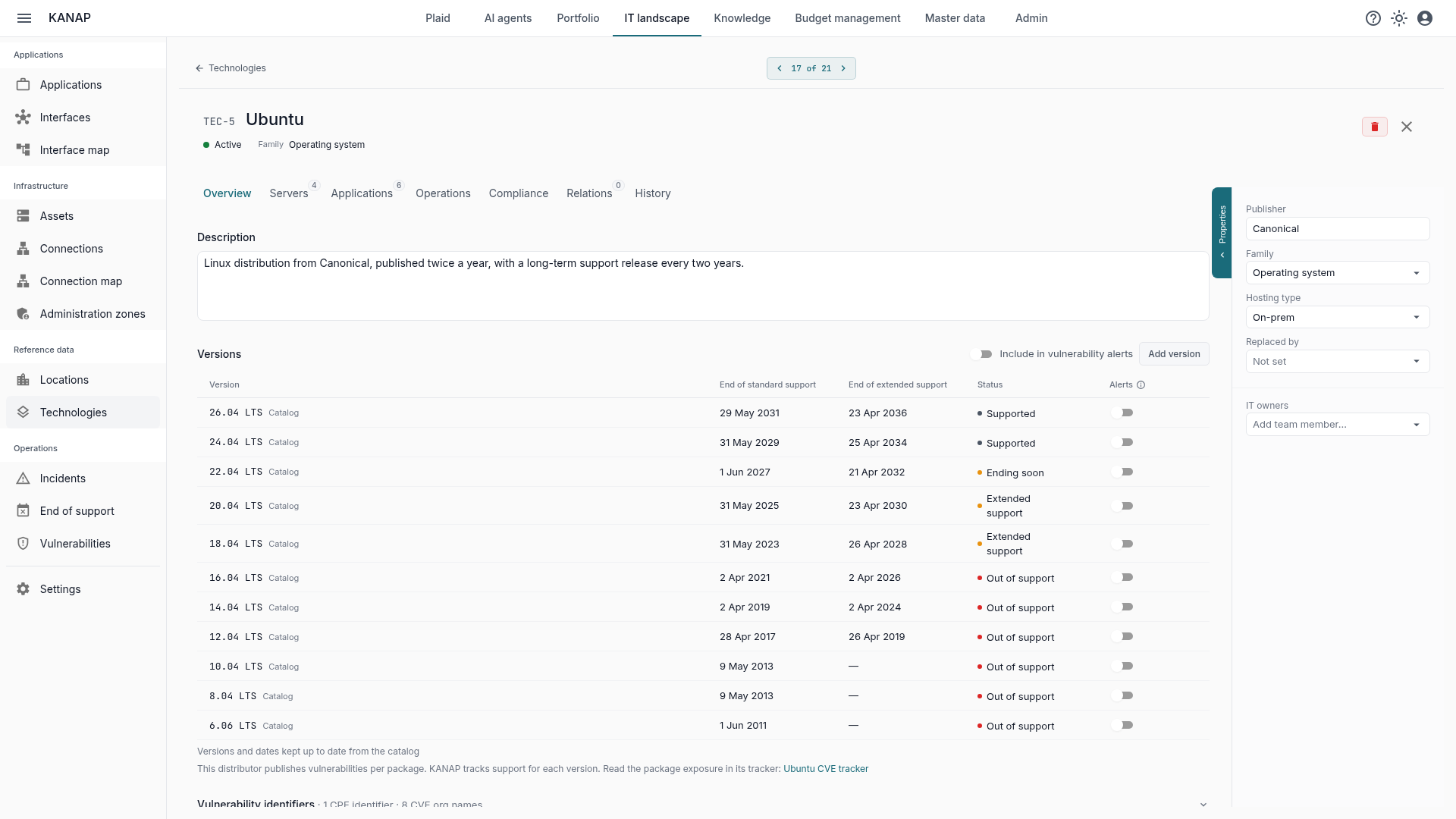
A technology carries one row per version, with the end of standard support and the end of extended support. KANAP derives a status from them: supported, ending soon when standard support stops within 12 months, extended support, out of support, or date unknown.
One row per major version is enough: 2019 and 2022 for SQL Server, 8.0 for vSphere. Servers, applications and everything that follows rest on these rows. The end of support report, which we will present in an upcoming article, starts from there.
Creating the links
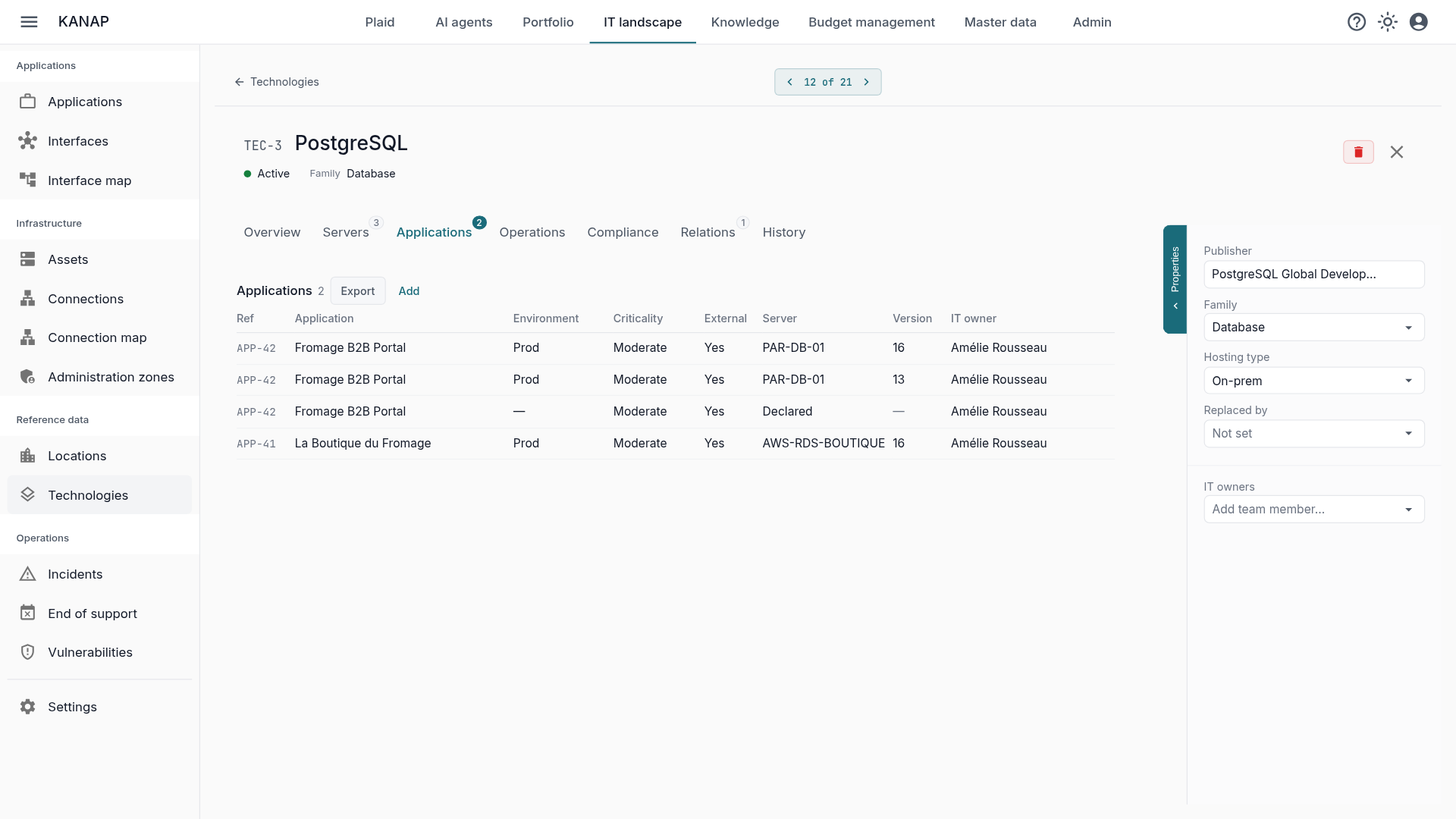
A technology is entered where it is installed: on the host for a hypervisor, on each domain controller for Active Directory, on the database server for SQL Server. The rest is handled automatically.
- Machines that inherit it indirectly receive it with no further entry. SQL Server installed on a cluster appears on each of its members.
- Applications hosted on these servers receive it too: KANAP derives them from their deployments.
- Online services run on none of your servers. Entra ID is then declared on the applications that use the service.
A server’s operating system is a technology too. The catalog offers fourteen: Windows Server, the main Linux distributions, AIX, IBM i and Solaris. It appears at the top of the server record, with its version and support dates.
Getting started
Your technologies can be entered as you go or in bulk.
From a CSV file. The technology list imports and exports the links: servers and technologies on one side, applications and technologies on the other. A preliminary check lists what the load would do, row by row, and nothing loads if a row has an error. An import adds or updates links; it never deletes any. A version you were not tracking yet is created along the way.
Netbox. If your inventory is already there, KANAP maps each Netbox platform to an operating system: “Debian 12” becomes Debian, version 12. Virtual machines join their cluster and receive the technologies installed on it. See the article Your hardware inventory already exists, and it is in Netbox.
The benefits
Once the technologies are linked, the questions from the introduction get their answer with no extra work.
- End of support can’t be missed: the report names the servers and applications using a version that reaches end of support, within the horizon you choose.
- Vulnerabilities: published vulnerabilities are matched version by version, all the way to business applications. This is the subject of the article Vulnerabilities: from the CVE to the business application.
- Privileged access: a directory service such as Entra ID is placed in an administration zone, for example Tier 0. The zones view flags the servers that carry a directory outside the most sensitive zone.
- Cost: a technology’s Relations tab gathers its contracts, with their due date and annual amount, and its budget lines, with their total. What vSphere costs can be read on its record, next to the servers that carry it.
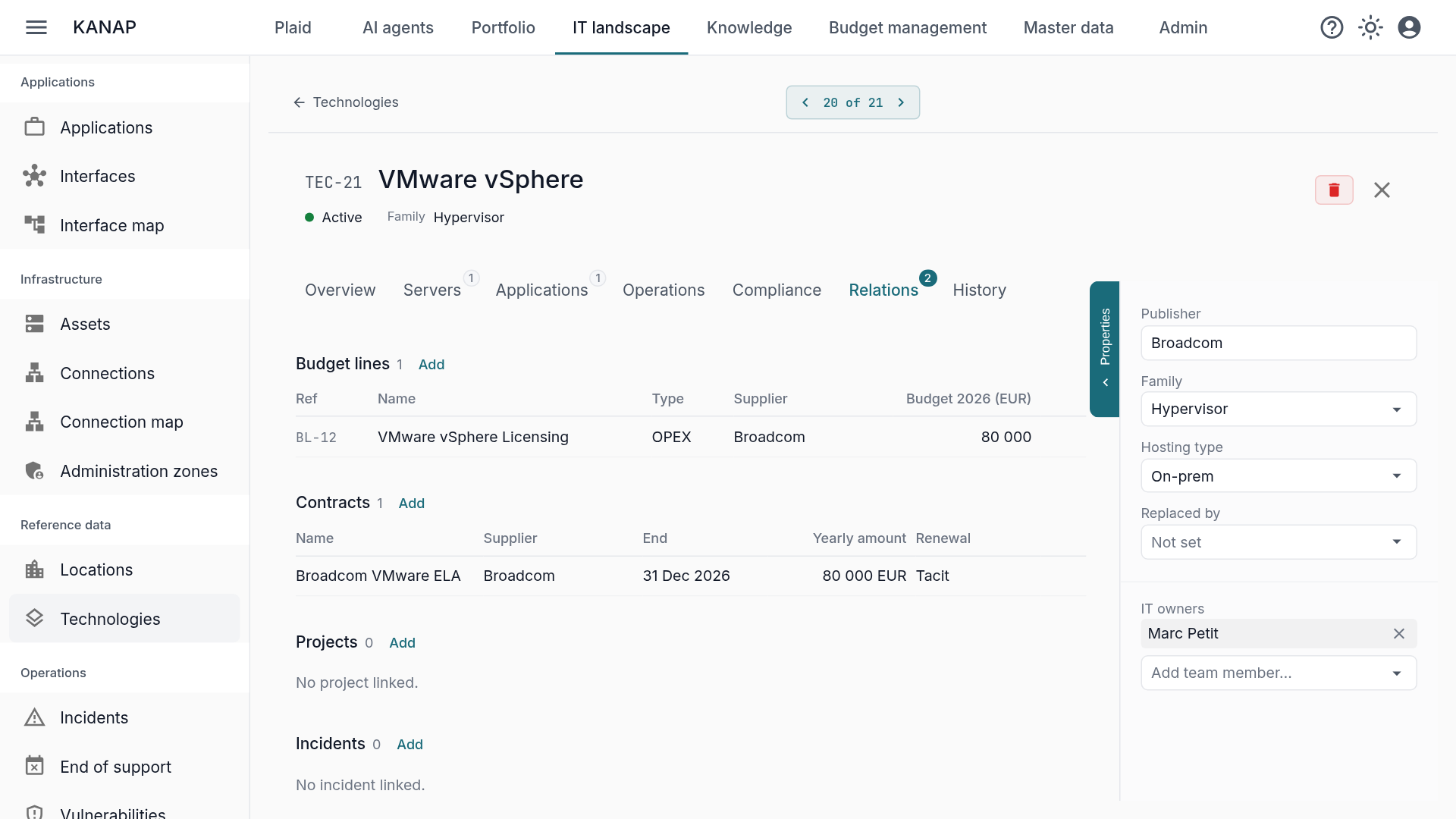
The record also names the technology’s IT owners and its support contacts, with their contact details. And Plaid, the assistant built into KANAP, or your own AI tool connected over MCP, answers directly: “Which servers still run SQL Server 2016?”
Where to start
- Adopt your technologies from the catalog, starting with operating systems, databases and hypervisors.
- Link them to servers, on the host or the cluster where relevant, by hand, from a CSV file or through Netbox.
- Declare online services on the applications that use them.
- Name the IT owners of each technology.
KANAP does not discover the software installed on your servers and does not manage licenses: the links come from you, from a file or from Netbox.
To see all of this in action, a free 14-day trial of our hosted version gives access to the sample data of the fictional Fromage & Co group, loaded in a minute. KANAP is fully open source: it can also be installed for free on your own servers.